RECOVERY METHOD
1. Turn the Switch to position "1”
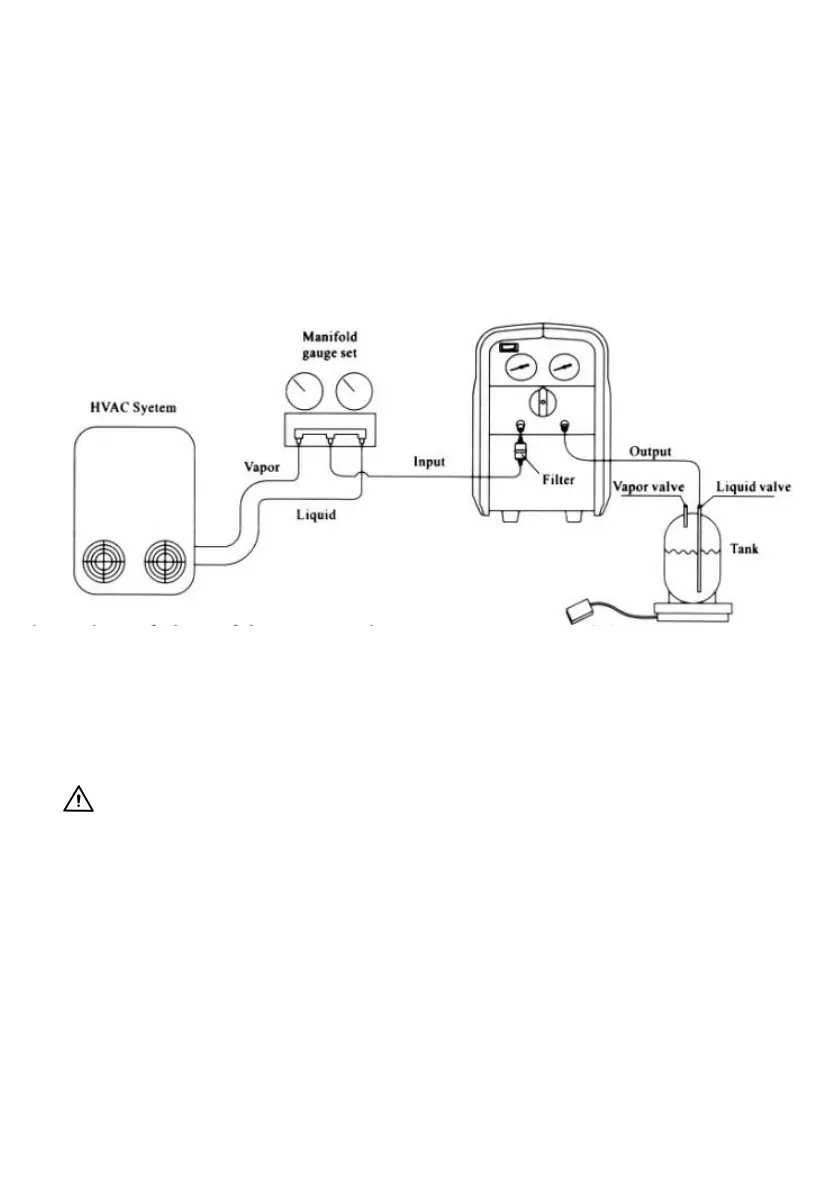
2. Correctly and firmly connect the hoses. (See Connection Drawing)
3. Connect the unit to the right power supply(as shown on the Name
plate)
Please Press the”START”button to start the unit
4. Open the gas valve and liquid valve of the refrigerant tank.
5. Turn the Switch to position "2” to start Push/Pull Mode operation
recovery
6. Slowly turn the Switch to Position”2” for faster recovery.
Notice
If compressor impact occurs, turn the Switch to position "1"
If the impact still occurs, please slowly turn the switch within the limits of
the yellow area, and the indicating value of Low Pressure gauge begin to
drop, until the impact stops. But the pressure should be above 0>
otherwise the intake port cannot take air.
(About the yellow, please see the knob diagram in page 10)
If the power goes off when the unit is working, and the unit cannot
restart, you can turn, the Switch 2 rounds and stop at position turn the
power on and hit the Start button to start the unit.
7. When liquid recovery is finished, turn the Switch to position "2" for faster
recovery.



 To Next Page