Deleting a Badge:
Display shows
Press
The badge is now deleted from the system
Deleting a Code:
Display shows
Enter teh code you wish to delete and press
Display shows
Press
The code is now deleted from the system
Managing Badges / Access Codes - Continued
Deleting Badges/Codes (XMA/WMB)
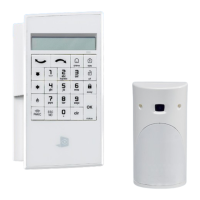
Perform 'Accessing Level 3 Programming' and verify you are in
Access Level 3
Press the until the display reads
Press and use the to move to
Press . Display will show the rst badge or code that is learned
into the system
Use the to nd the badge or code you wish to delete
Press
REENTER THE CODE
BADGES AND ACCESS
CODES
DELETING BADGES /
ACCESS CODES
DELETING CODE
NAME OF CODE
DELETING BADGE
NAME OF BADGE
Exiting From Programming
1. Keypad (XMA/WMB)
From any menu in programming you have exit back to the main screen
Hold the for 5 seconds to retunr to the main display
11


 To Next Page