Video distributor (Ref. GL-D4L-PLUS) for multiple colour monitors
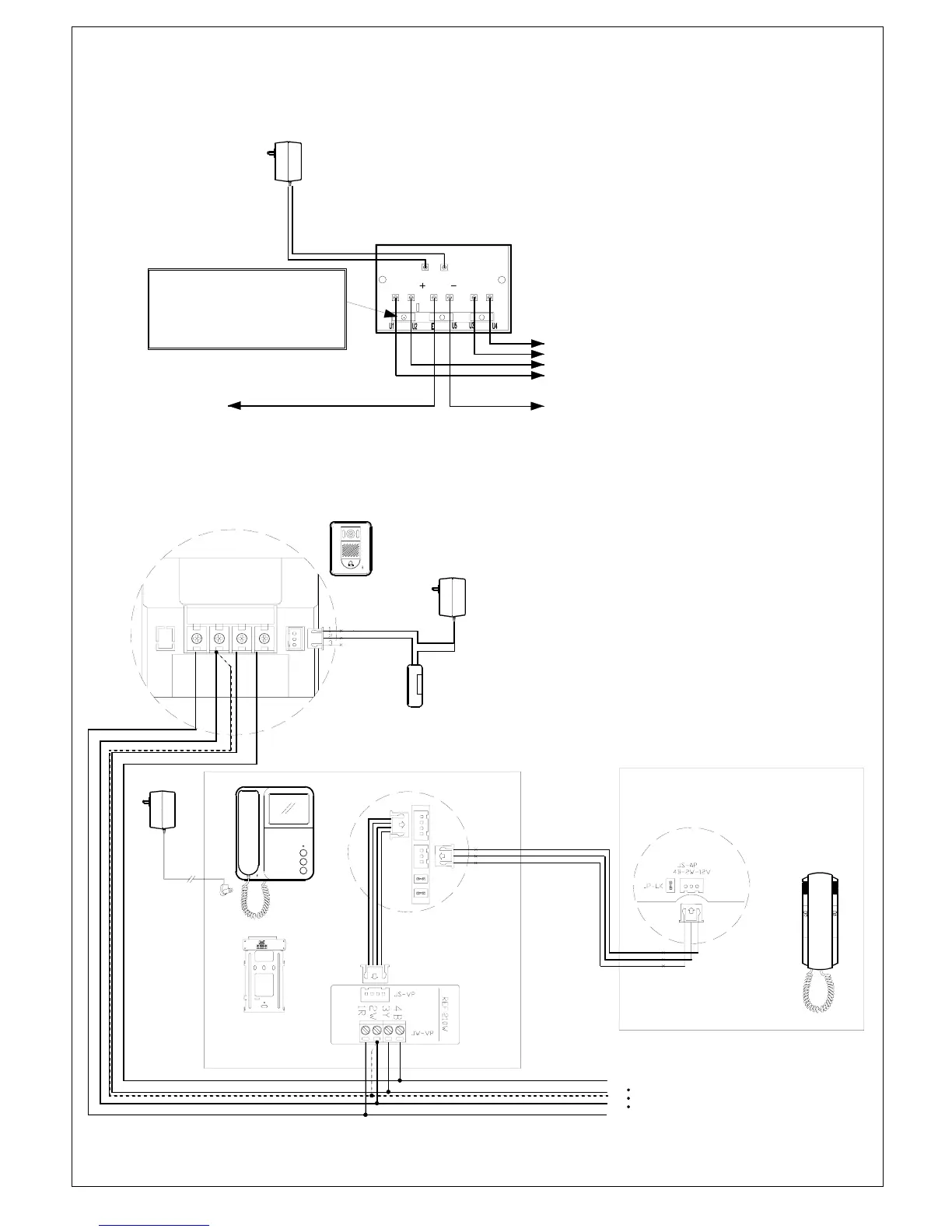
When more than one colour monitor is installed (Ref. VS-952M, VS-952PM) in a system, using a video amplifier (Ref.GL-D4L-PLUS).
This is highly recommended for better image.
JP1
In order to employ the output U5
of the video distributor,remove the
jumper terminal( JP1 ) on the PCB
to 3Y on Monitor #1
to 3Y on Monitor #2
to 3Y on Monitor #3
to 3Y on Monitor #4
to E(Video In) on Next Distributor
Video IN
From 3Y on Call Station
2W(Ground) wires
from Camera & Monitors
MUST connect to
this GND terminals.
Ref.GL-D4L-PLUS
(+) (-)
R2 R1
Ref. SE-12VDC05Adpt
Loop Out
Fig. 14
System connection with audio Handset
JP-VD
JP-LK
JS-AP
JS-VP
INDOOR MONITOR
DC IN
AUDIO HANDSET
VS-902H
MOUNT BRACKET
OUTDOOR STATION
VS-902C
VS-952C
4B3Y2W1R LB
Fail-Secure
Door Latch
POWER SUPPLY
FOR DOOR LATCH
TO NEXT
MONITOR(S)
Fig. 15
Ref.
VS-902PSU
*Broken line indicates Shield wire if any
Page7



 To Next Page