CONTROL CABINETS - TECHNICAL MANUAL EN-UK - V.1.3 - 14/07/16
13
DE
AUDIO & VIDEO CONTROL CABINETS
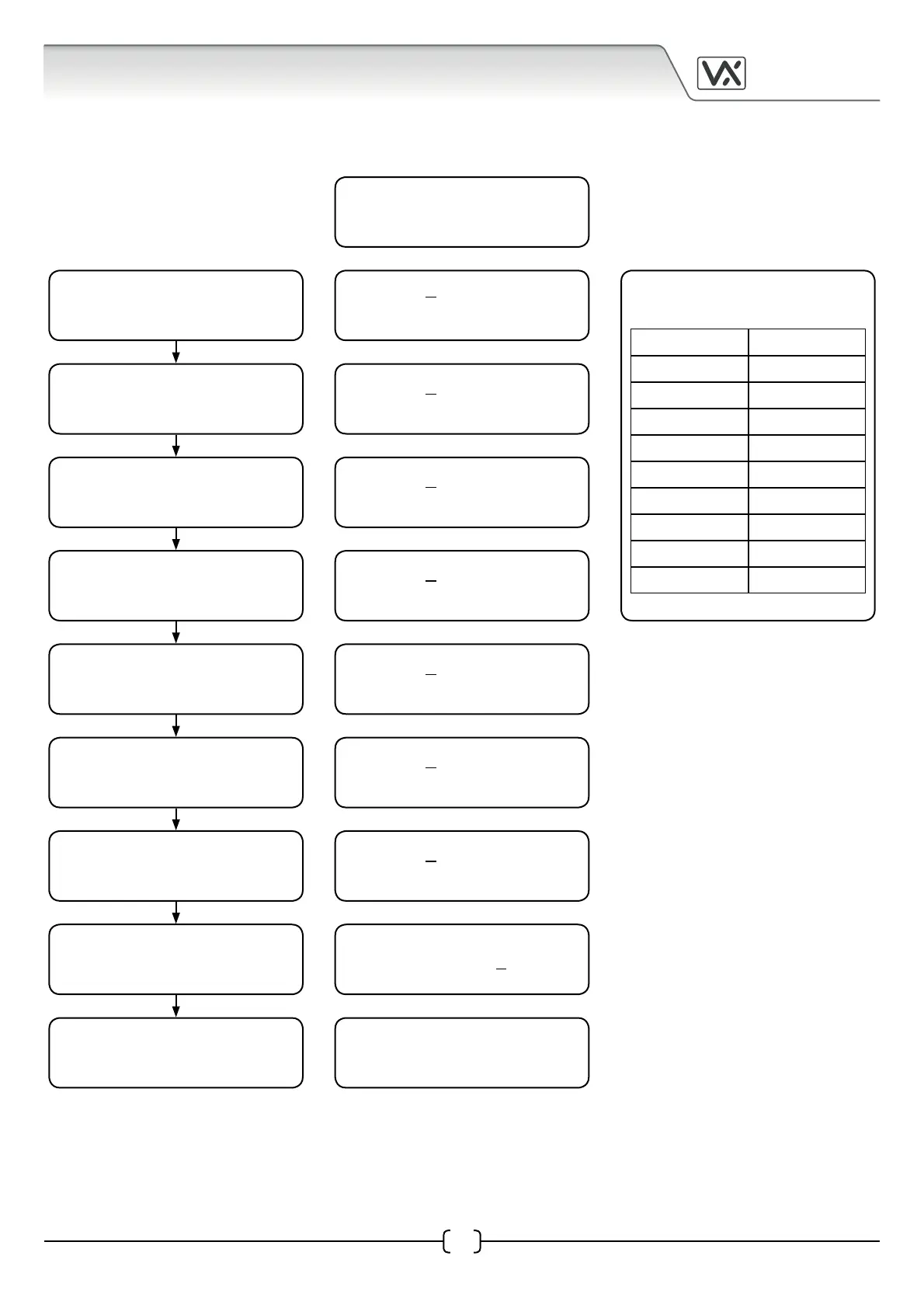
Programming Flow Chart
The days of the week are
abbreviated as shown below:
Monday Mo
Tuesday Tu
Wednesday We
Thursday Th
Friday Fr
Saturday Sa
Sunday Su
Week Days WD
Weekends WE
All Days AD
Monday 15:20
15/02/02 GMT OFF
TIME - 15:20
DATE - 15/02/02
ON 1 - 10:15 AD
OFF 1 - 10:30
ON 2 - 11:00 Mo
OFF 2 - 12:30
ON 3 - 15:45 WD
OFF 3 - 17:20
ON 4 - 18:15 We
OFF 4 - 20:15
ON 5 - 19:30 WE
OFF 5 - 20:45
ON 6 - 10:00 AD
OFF 6 - 19:00
RELAY TIME - 05
Monday 15:20
15/02/02 GMT OFF
Press the mode button to
edit the time and date.
Press the mode button to
edit the 1st ON/OFF time.
Press the mode button to
edit the 2nd ON/OFF time.
Press the mode button to
edit the 3rd ON/OFF time.
Press the mode button to
edit the 4th ON/OFF time.
Press the mode button to
edit the 5th ON/OFF time.
Press the mode button to
edit the 6th ON/OFF time.
Press the mode button to
edit the relay time.
Press the mode button to
return to standby mode.
DISPLAY
IMPORTANT NOTE: to reset the time clock completely, simply power up whilst pressing the UP (S) button.


 To Next Page