13
Vidikron Vision Model 50 Owner’s Operating Manual
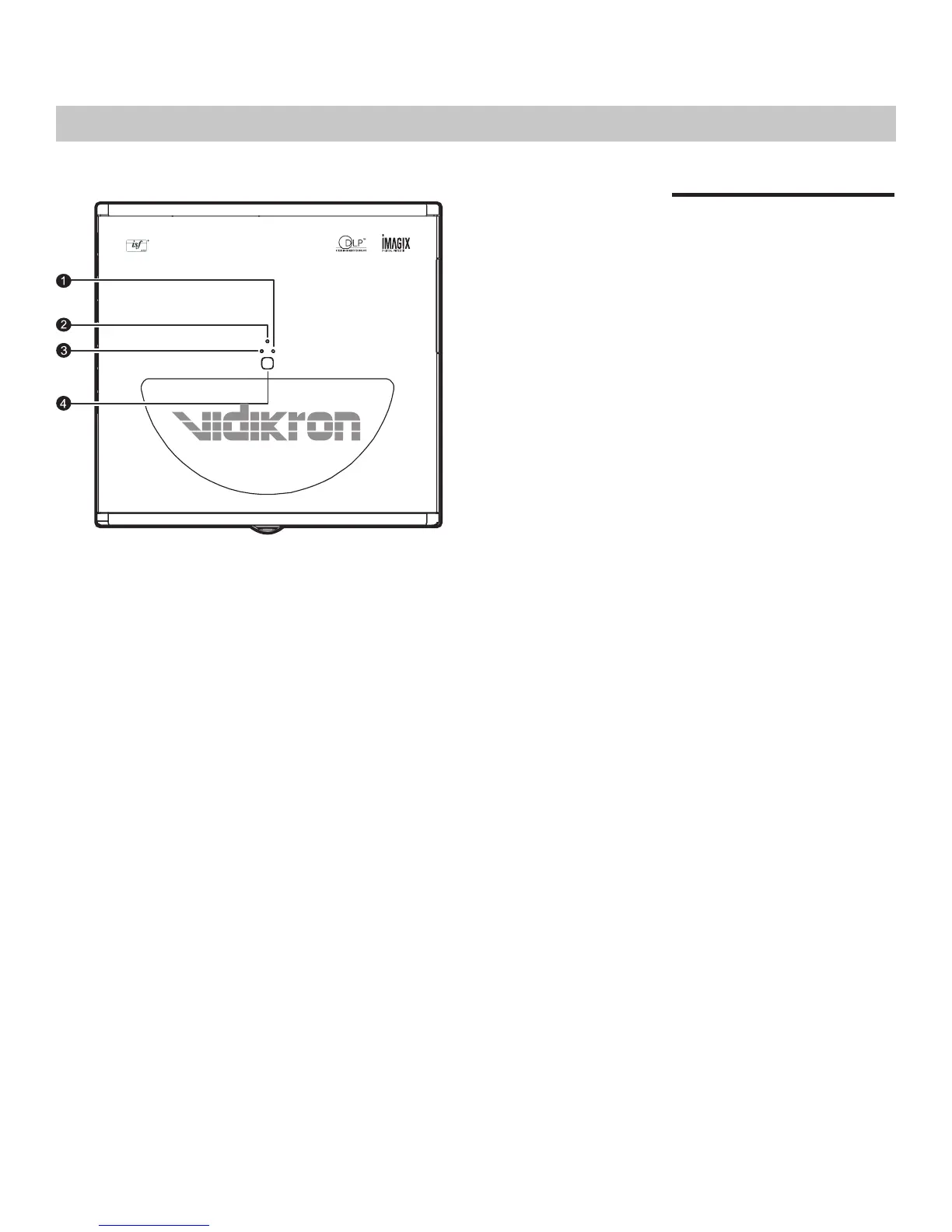
1. LAMP LED
Indicates the status of the lamp
- Red when the lamp has exceeded
its usage life or developed a problem.
Please contact your Vidikron Dealer
for assistance.
- Flashing Red when the fans are
not working or the lamp cover is
open. Please contact your Vidikron
Dealer for assistance.
2. POWER LED
Indicates the status of the power
- Orange when the AC power cord
is plugged into a wall outlet (standby
mode). Once in standby mode, you
can turn on the projector by
pressing the ON button on the
remote control.
- Green when the power is turned
on (operational mode).
- Flashing Orange for the first 45
seconds after power-up indicating
that the lamp is warming up.
- Flashing Green for 110 seconds
after the projector was powered off
indicating that the lamp is cooling
down.
3. TEMP LED
Indicates the status of the fans and
internal temperature
- Red when the internal temperature
is too high. Please contact your
Vidikron Dealer for assistance.
- Flashing Red when the fans are
not working or the lamp cover is
open. Please contact your Vidikron
Dealer for assistance.
4. TOP IR SENSOR
Controls and Functions
Control Panel


 To Next Page