14
Vidikron Vision Model 50 Owner’s Operating Manual
Connector Panel
Controls and Functions
(G) Y
(G) Y
(B)PB/CB
BPB/CB
(R)PR/CR
12V
OU
T
12V
OU
T
(R)PR/CR
H
H
V
V
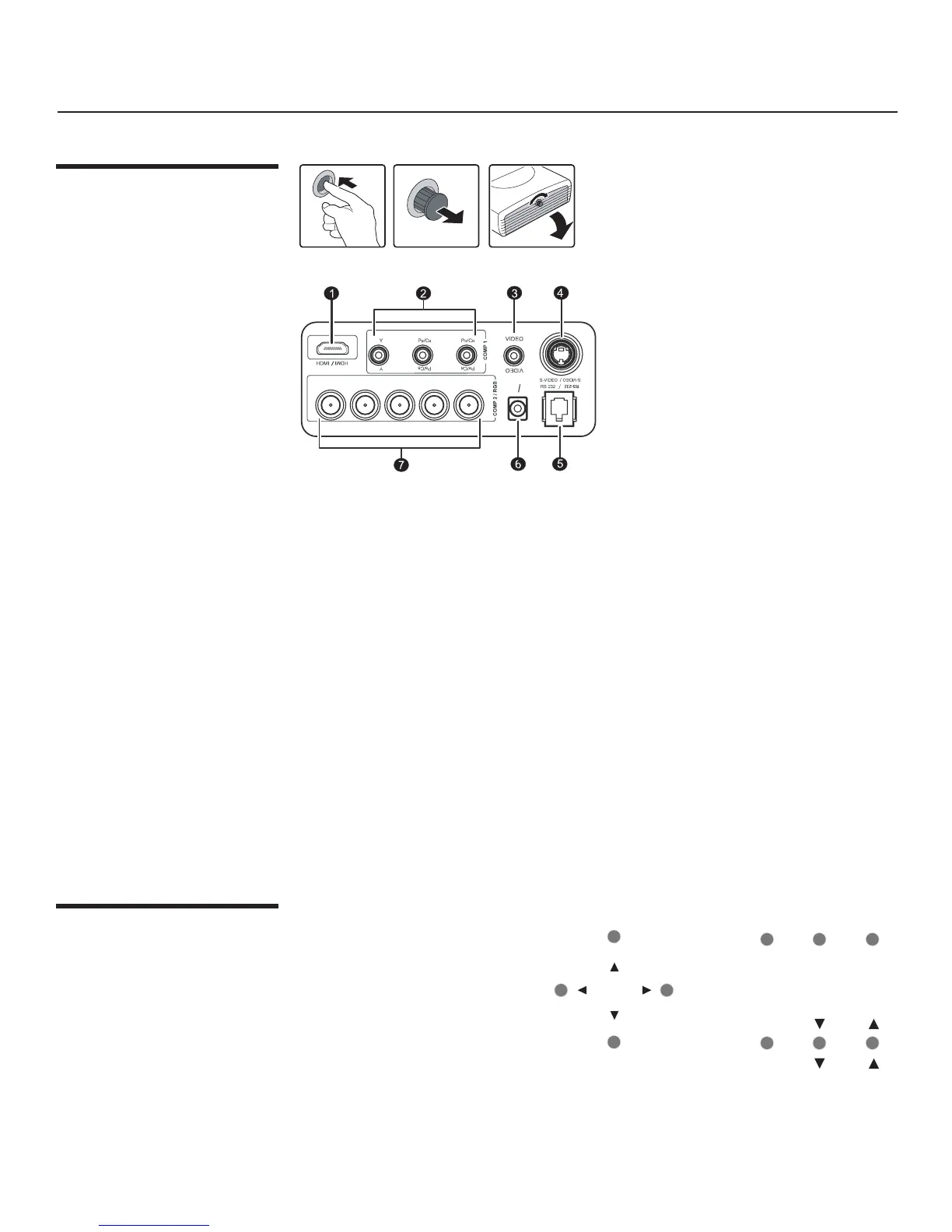
To access the connector panel, press the
door release button so it pops out. Turn
the knob clockwise or counter-clockwise
and pull firmly on it to open the door.
1. HDMI (High-Definition Multimedia Interface) Input
Digital video signal input
2. Component (RCA Jacks)
480i Component (Y/CB/CR) video signal input
3. Video (RCA Jack)
Composite video signal input
4. S-Video (mini DIN 4-pin) Y/C (S-video) signal input
5. RS-232C (RJ-11 Jack)
RS-232C control signal input (refer to page 51 for details)
6. 12v Trigger (mini jack, diameter 5.5 mm outside, 2.5 mm inside)
+12V output, active when the projector is turned on
7. RGB/ HDTV (BNC) or Progressive Scan DVD players
DTV Y/P
B/PR or DTV RGB video signal input
To control the projector when signals
from a remote control cannot reach
it, use the built-in keypad next to
the connector panel.
Because the built-in keypad has
fewer keys than the remote keypad,
certain projector functions are
accessible only through the menu
system rather than via a direct key.
Built-In Control Panel
ZOOM+
ZOOM+
ZOOM-
ZOOM-
POWER
POWER
MEMORY
MEMORY
LENS
SHIFT
LENS
SHIFT
SOURCE
/ENTER
SOURCE
/ENTER
MENU
/EXIT
MENU
/EXIT


 To Next Page