27
Vidikron Vision Model 50 Owner’s Operating Manual
Connections
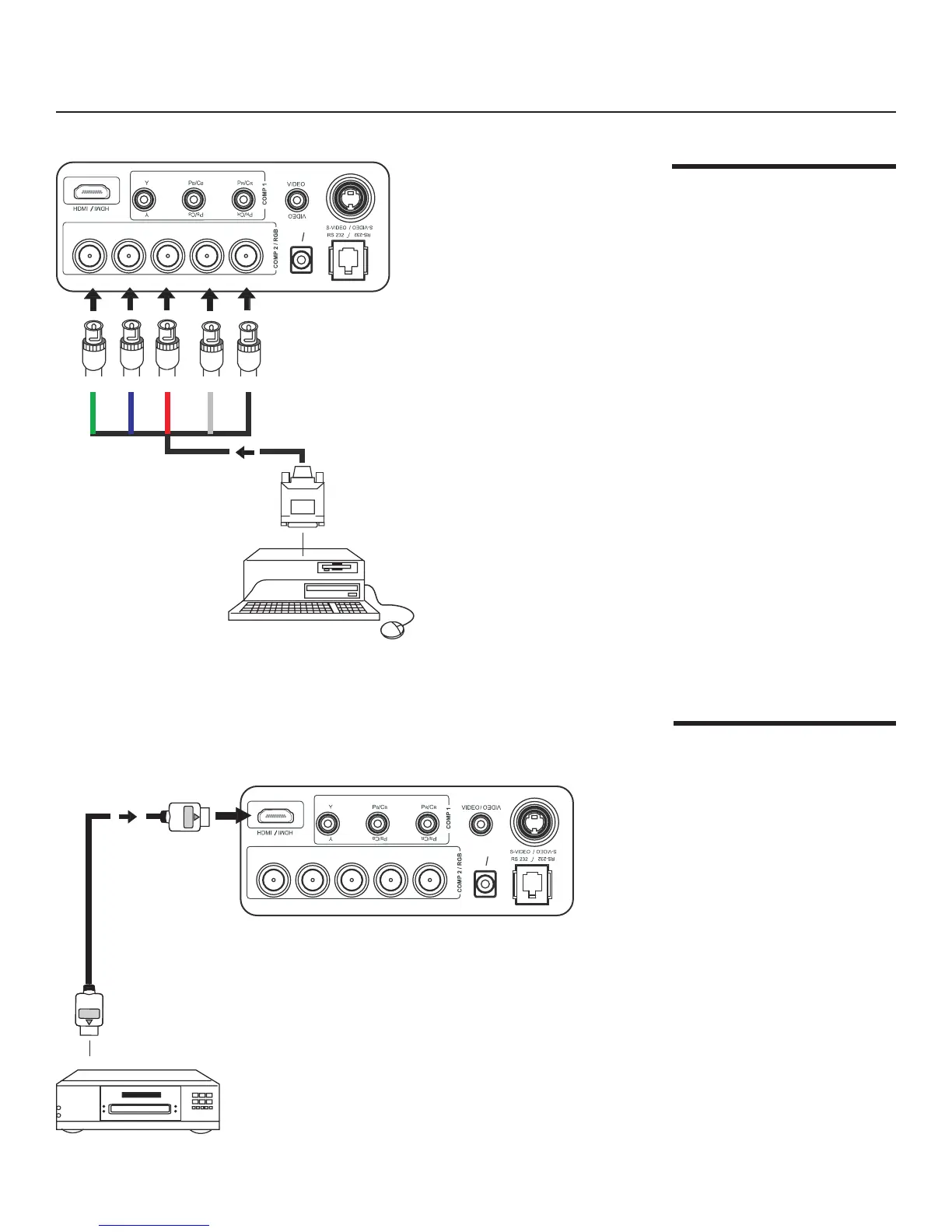
Connecting a
Computer (GBRHV)
Connecting an HDMI™
Device
The projector supports the
following computer resolutions:
1024x768, 800x600 and 640x480.
Use an HDMI (High-Definition Multimedia Interface) cable to connect the projector to an
HDMI device.
PC or Notebook
(PC, RGB, Analog,
HD Component,
Progressive DVD)
HDMI Source
(DVD player or HD
tuner with HDMI
or DVI out)
Green Blue Red Horiz Vert
(G) Y
(G) Y
(B)PB/CB
BPB/CB
(R)PR/CR
12V
OU
T
12V
OU
T
(R)PR/CR
H
H
V
V
(G) Y
(G) Y
(B)PB/CB
BPB/CB
(R)PR/CR
12V
OU
T
12V
OU
T
(R)PR/CR
H
H
V
V


 To Next Page