47
Vidikron Vision Model 50 Owner’s Operating Manual
Lamp Replacement
The lamp should be replaced when it reaches the end of its life (typically 2000 hours), or
sooner if a noticeable degradation in brightness occurs.
1. Turn off the projector and unplug the power cord.
Allow the projector to cool down for approximately
45 minutes prior to removing the lamp assembly for
replacement.
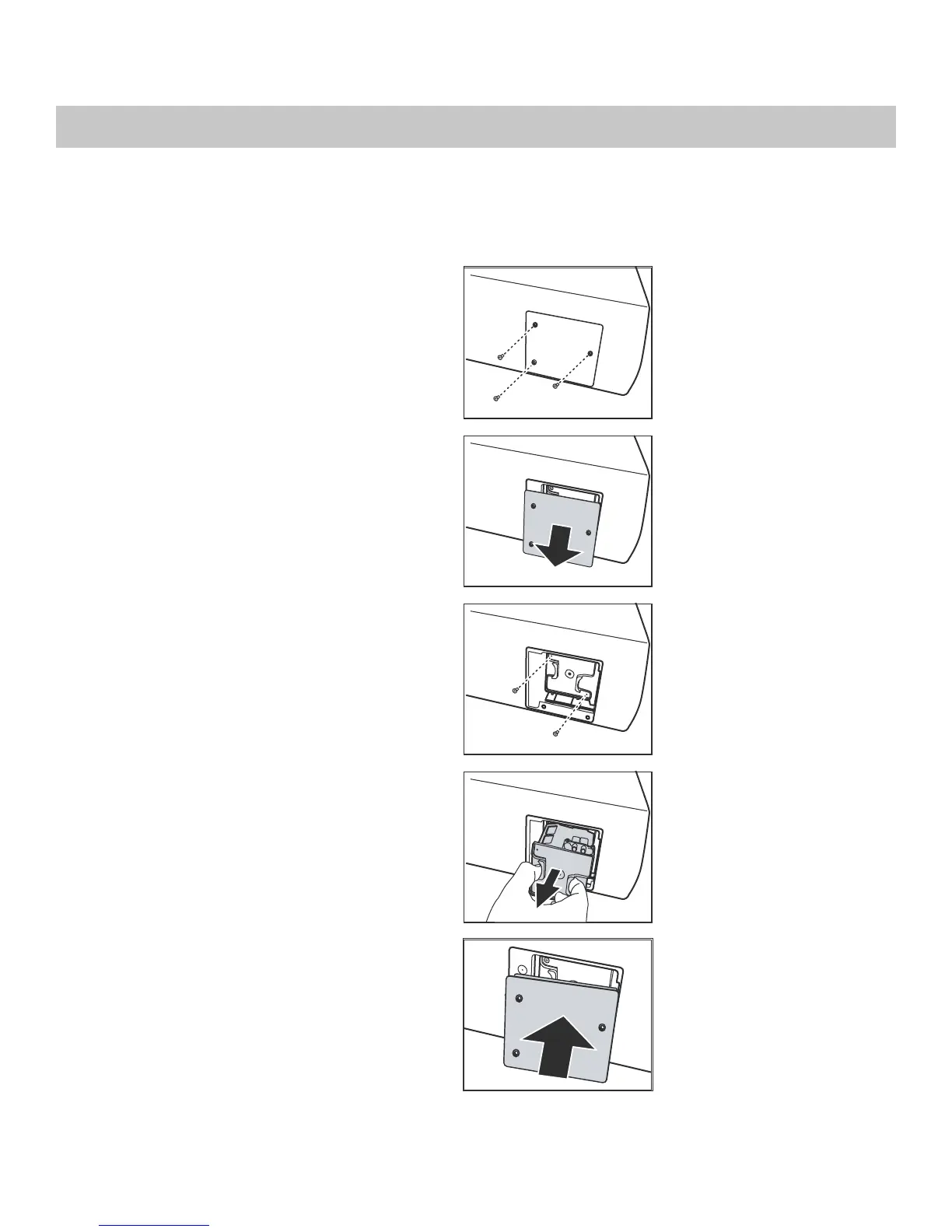
2. Remove the three screws from the lamp cover.
3. Remove the lamp cover.
4. Remove the two screws from the lamp module.
5. Pull the lamp module straight out to remove it.
6. Insert the new lamp module securely and replace the
two screws.
7. Replace the lamp cover at the top side first as shown
and secure it with the three screws.
8. Turn on the power and go into the Service/Reset Lamp
Timer menu to reset the lamp timer. Refer to “Service”
in the previous section, On-Screen Display Menus.


 To Next Page