9
Control
Operating controls and indicators (cont.)
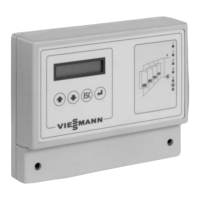
Push buttons
Subject to configuration and operating level, keysĂ , , and can be used
to display and/or amend the various details in the main and sub-menus. The
key function is subject to the respective menu item that is displayed when the
key is pressed.
Function in standard mode:
Scroll up the menu and/or increase the set value
Scroll down the menu and/or reduce the set value
Back to the previous menu and/or reinstate the previous set value
Menu selection and/or activation of the set value to change or confirm the
set value
Function during the configuration process (limited function):
Change the menu selection or increase the set value
Change the menu selection or reduce the set value
No function
Confirm the set value and scroll to the next configuration menu item.
Function display
"9": H flashes if the control unit has been connected to the
mains supply but has not yet been configured,
H illuminates permanently after configuration
"1 to 4" and "
": illuminate if the corresponding system component is
operational.
"U": illuminates in case of faults
5862Ă474ĂGB











 To Next Page