10
Control
Operating level selection
The control unit has three operating levels.
Operating levelĂ1
Display of simple parameters, such as operating mode and software version.
Operating levelĂ2
Display of the most important operating details (e.g. actual and set flow
temperature, switching periods and settings, such as set room temperature,
set flow temperature) and modification of set values.
Operating levelĂ3
System and device configuration.
Access to the operating levels
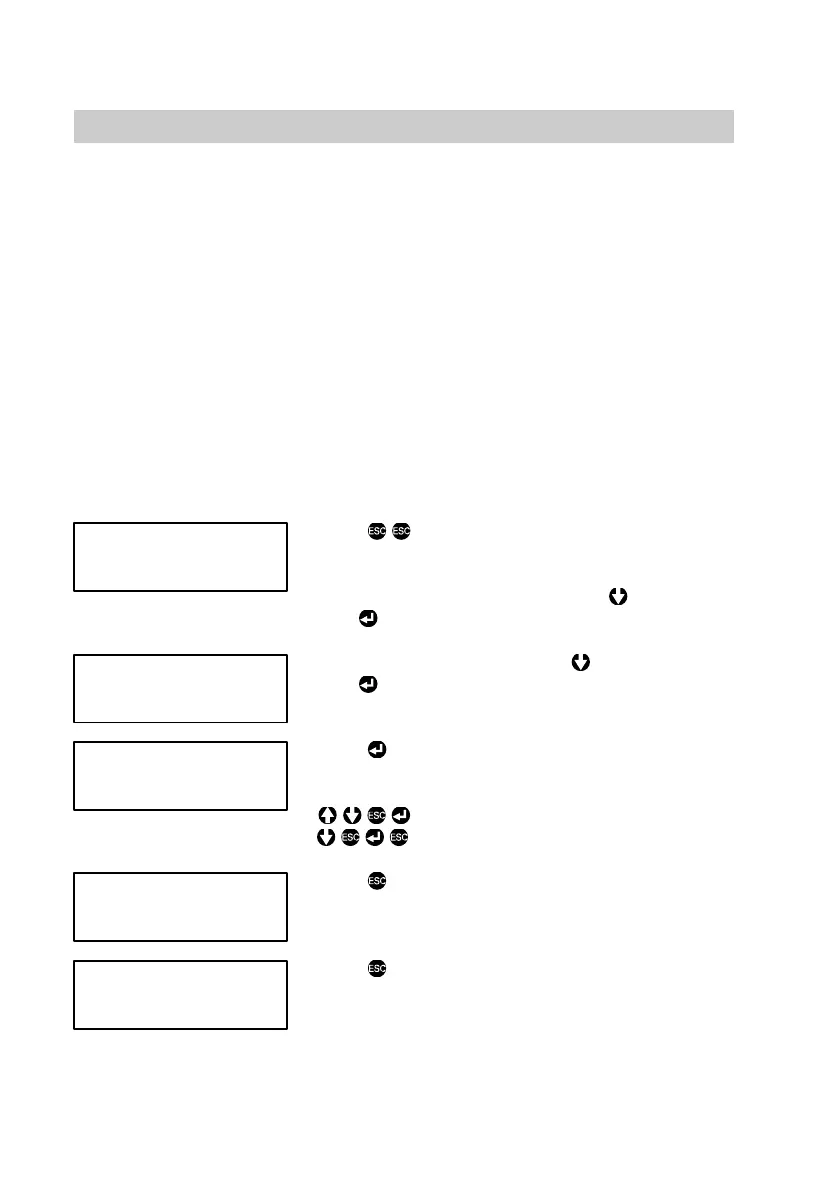
Press
, "General control unit" will be
displayed.
When "Multi-boiler control unit" is displayed,
select "General control unit" with
and confirm
with
.
Select "Operating level" with and confirm
with
; operating levelĂ1, 2 or 3 will then be
displayed.
Press , figureĂ"1"or "2" will then flash.
Enter the following access code for the required
operating level:
for operating levelĂ2
for operating levelĂ3
Press
, "Operating level" is then displayed.
This confirms the selection of the required
operating level.
Press
to return to "General control unit".
Please note:
The control unit automatically reverts to operating levelĂ1, if no key is pressed
within an hour.
5862Ă474ĂGB
Control unit 001ĆA
General
Operating level
Operating level 1
[ ]
Operating level
Control unit 001ĆA
General











 To Next Page