33
Note
Bundle the power cables below the
extension kit and secure with cable ties.
Connecting the extension kit to the control unit
Connecting the flow temperature
sensor
Push sensor plug
?
into the corre-
sponding socket of the control unit.
Installation and service instruc-
tions of the relevant control unit
Connecting the mixer motor
Push cable plug
gS
into the corre-
sponding socket of the control unit.
Installation and service instruc-
tions of the relevant control unit
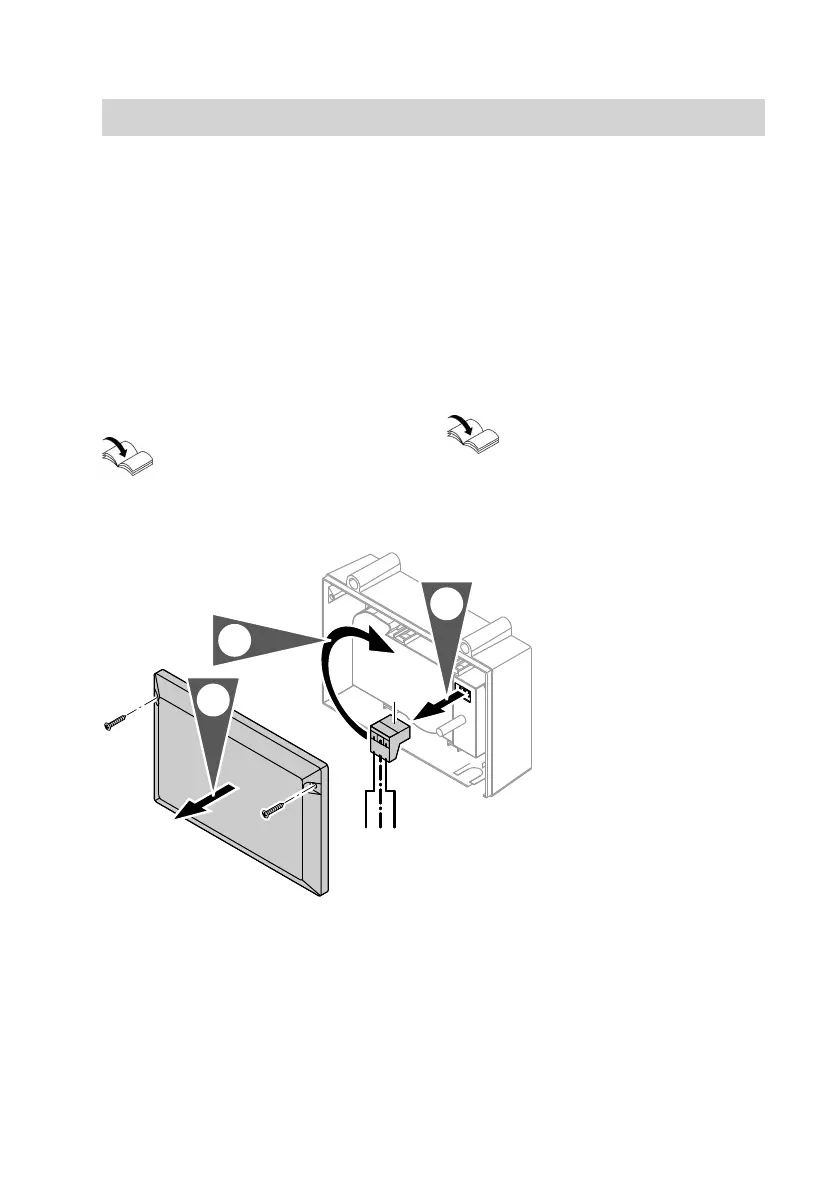
Changing the rotational direction (if required)
1. Switch OFF the power supply to the
control unit.
2. Remove the enclosure lid.
3.
Pull out 3-pin plug A in the mixer
motor.
4.
Insert 3-pin plug A in the mixer
motor rotated through 180°.
5. Check the rotational direction.
Extension kit without mixer PCB
5443 825 GB


 To Next Page