19
Example
■
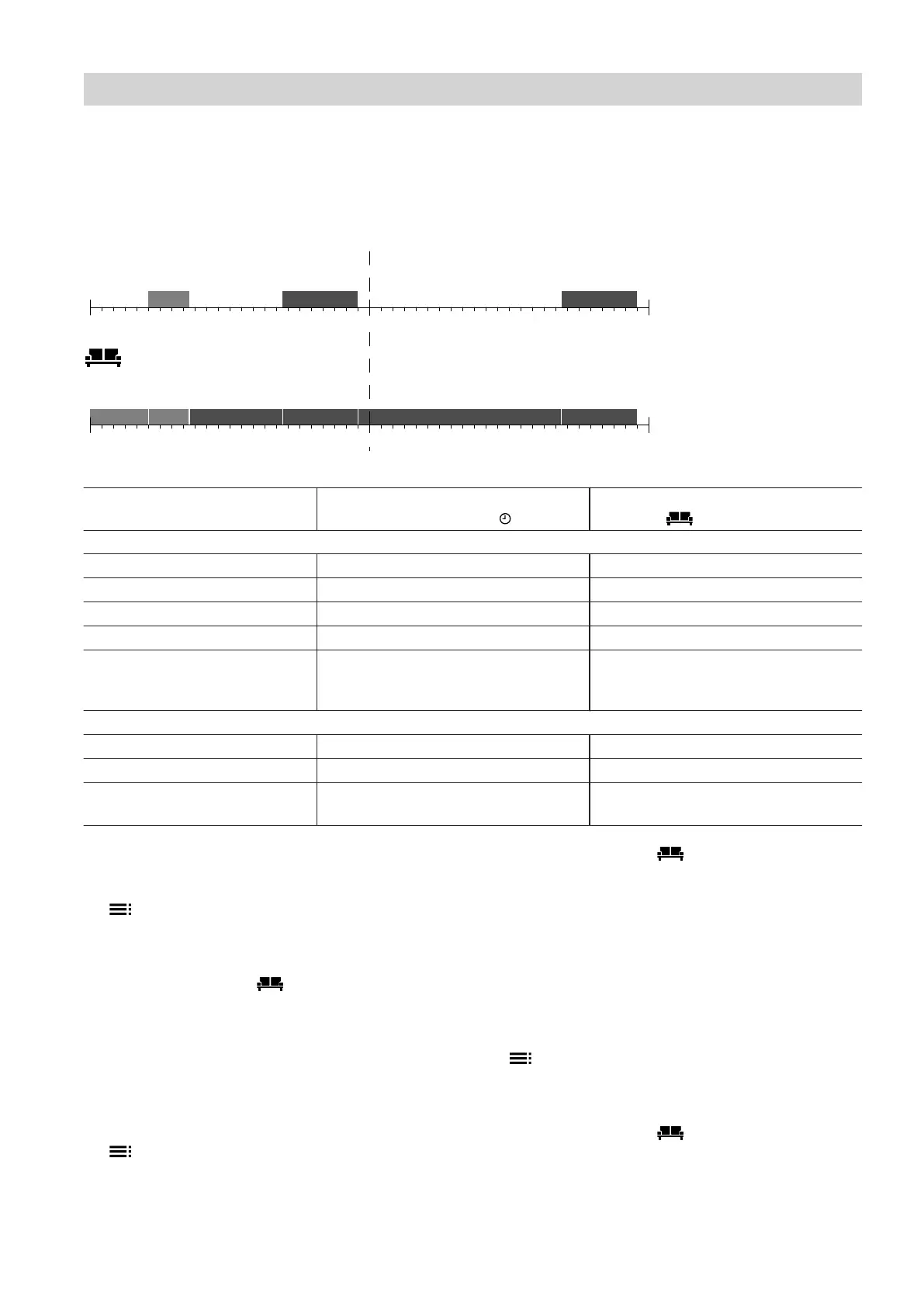
2 time phases are set for Monday.
■
1 time phase is set for Tuesday.
Mo
u
0 2 4 6 8 10 12 14 16 18 20 22 24
Di
2 4 6 8 10 12 14 16 18 20 22 24
Mo
0 2 4 6 8 10 12 14 16 18 20 22 24
Di
2 4 6 8 10 12 14 16 18 20 22 24
Fig. 6
Temperature levels corresponding
to the set time program
Temperature levels when "Holidays
at home" is active.
Monday
Before the 1st time phase Reduced room temperature Standard room temperature
1st time phase Standard room temperature Standard room temperature
Between 1st and 2nd time phase Reduced room temperature Comfort room temperature
2nd time phase Comfort room temperature Comfort room temperature
After the 2nd time phase Reduced room temperature Comfort room temperature, because
the next time phase is the 1st time
phase for Tuesday.
Tuesday
Before the 1st time phase Reduced room temperature Comfort room temperature
1st time phase Comfort room temperature Comfort room temperature
After the 1st time phase Reduced room temperature Temperature level corresponding to
the 1st time phase for Wednesday
Setting "Holidays at home"
1. Extended menu:
2. "Quick select"
3. "Holidays at home"
4. Set the start and end date.
"Holidays at home" is set and is automatically
activated on the selected day.
Changing "Holidays at home"
1. Extended menu:
2. "Quick select"
3. "Holidays at home"
4. "Change program"
5. Change the start and end date.
"Holidays at home" is set and is automatically
activated on the selected day.
Cancelling or deleting "Holidays at home"
1. Extended menu:
2. "Quick select"
3. "Holidays at home"
4. "Delete program"
"Holidays at home" is terminated and deleted.
Central heating
Adjusting the room temperature for longer… (cont.)
5839324



 To Next Page