to return to the previous menu,
When powering on your receiver for the first time, the installation Wizard will
starts automatically.
Please follow the installation wizard. This will assist you to complete the set-up
process. Without this process, the receiver will not work properly.
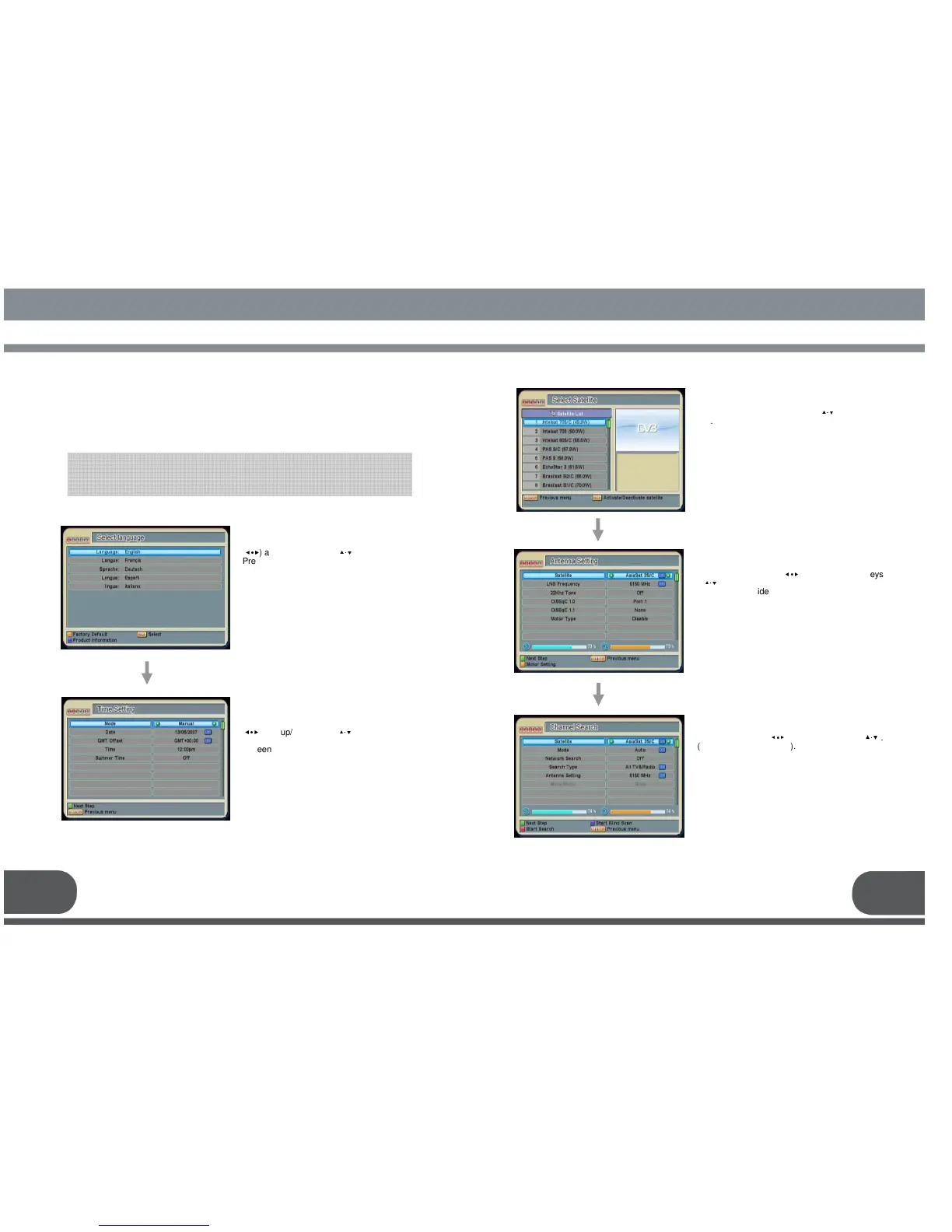
4.1.1. Select Language
4.1.2. Time Setting
Select a language by using the
(
◀∙▶
) and up/down keys (
▲·▼
).
Press OK key to save the selected language as
a default language.
This will also change the language for the
menu.
* Yellow: Reset to settings from Factory
* Blue: Checking Receiver version
Date, GMT Offset, Time and
Daylight-saving by using the left/right keys
(
◀∙▶
) and up/down keys (
▲·▼
).
* Green: Go to the Next Step
SYSTEM SET
SYSTEM SETSYSTEM SET
SYSTEM SET
-
--
-
UP
UP UP
UP
11 12
4.1.3. Select Satellite
Select the appropriate Satellites from the
list by using the up/down keys (
▲·▼
) and ok
key.
* Green: Go to the Next Step
4.1.4. Antenna Setting
Set up the configurations on each satellites by
using the left/right (
◀∙▶
) and up/down keys
(
▲·▼
).
OK key will guide you to a list of options or the
sub-menu.
After the configuration, move to the Channel
Search menu by pushing the green key or
select the channel search button.
(For the specific information, refer to the
7.2.INSTALLATION).
* Green: Go to the Next Step
* Yellow: Motor Setting
4.1.5. Channel Search
Select a mode; Auto, Manual or Advanced by
using the left/right (
◀∙▶
) and up/down keys (
▲·▼
).
(Recommendation: Auto).
After the configuration, push the red key.
(For the specific information, refer to the
7.2. INSTALLATION).
* Green: Go to the Next Step
* Blue : Start Blind Scan.


 To Next Page