`
QUICK GUIDE TO MAJOR FUNCTIONS
QUICK GUIDE TO MAJOR FUNCTIONSQUICK GUIDE TO MAJOR FUNCTIONS
QUICK GUIDE TO MAJOR FUNCTIONS
13 14
connection will provides you with many different features. (Connection for HDD, Memory
Stick, or Digital Camera)
Formatting should be done first in order to record and capture.
Please refer to
▶
▶▶
▶
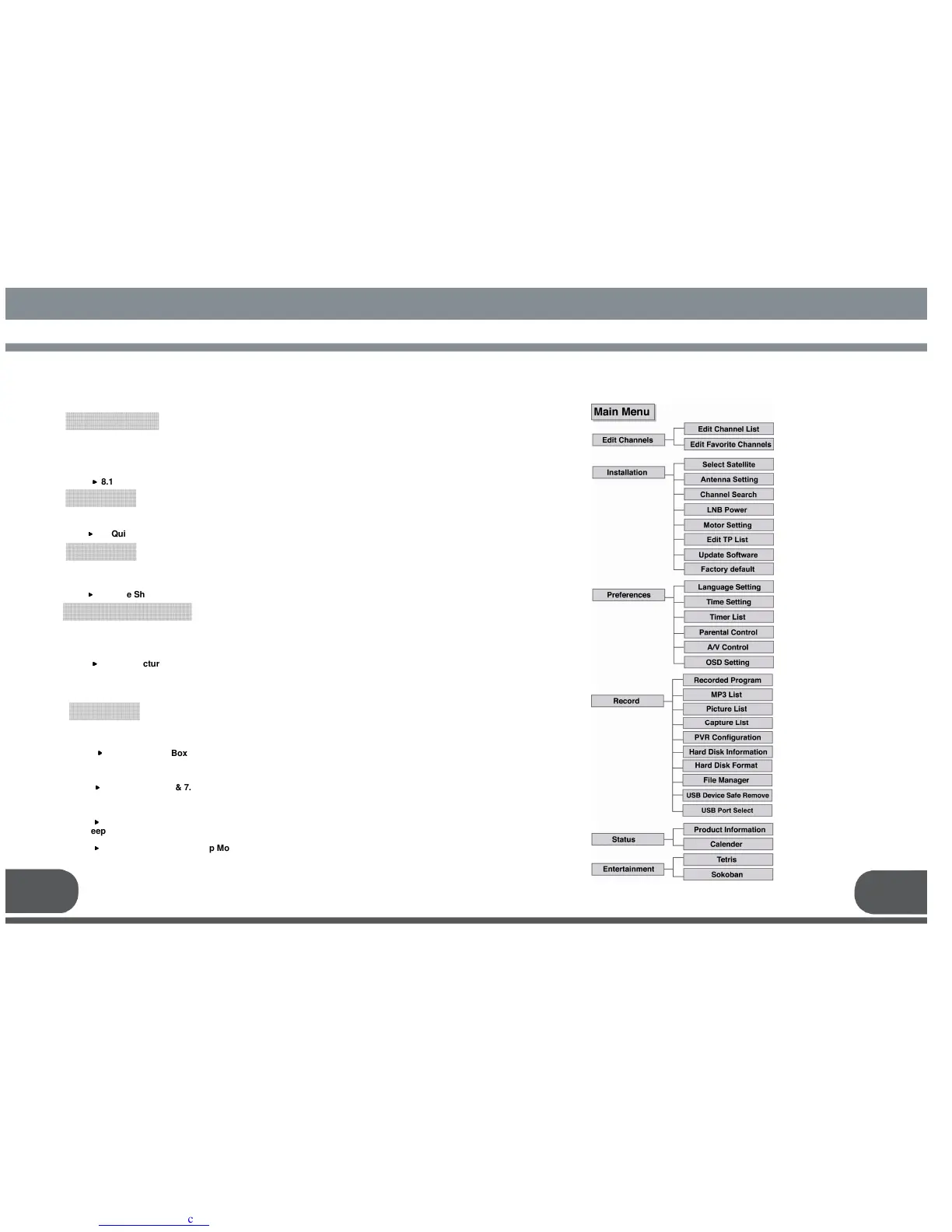
8.11 How to use USB(External storage)
This product, with external storage installed, enables you to record desired programs to
watch them for later. For simple recording or reserved recoding, please refer to
▶
▶▶
▶
9.2 Quick Record & 9.3 Reservation Record
Time Shift is a very useful function in case you have to leave TV for a while but do not
want to miss a live program. Simply push PAUSE before you leave, and push PLAYBACK
after. Then you will be able to continue watching the live program. Please refer to
▶
▶▶
▶
9.1 Time Shift
You can watch Two or Three programs at the same time. The possible combinations are;
- Live + Live + Live : Same screen
- Playback + Live + Live : Same screen
Please refer to
▶
▶▶
▶
8.7 PIP (Picture in Picture)
and is also a way to control functions. Please refer to
▶
▶▶
▶
8.1 Information Box
B. Image Viewer
You can watch pictures from your camera or storage. (JPEG files only). It also enables
to capture image shots of a live program and watch them later. Please refer to
▶
▶▶
▶
7.4.3 Picture List & 7.4.4 Capture List
C. MP3 Player
To listen to music, push the MP3 Key on the Remote(RCU).
Please refer to
▶
▶▶
▶
7.4.2 MP3 List
D. Sleep / wake up
You can set a timer to turn on or off the receiver at a certain time. Please refer to
▶
▶▶
▶
7.3.3 Timer List & 8.5 Sleep Mode


 To Next Page