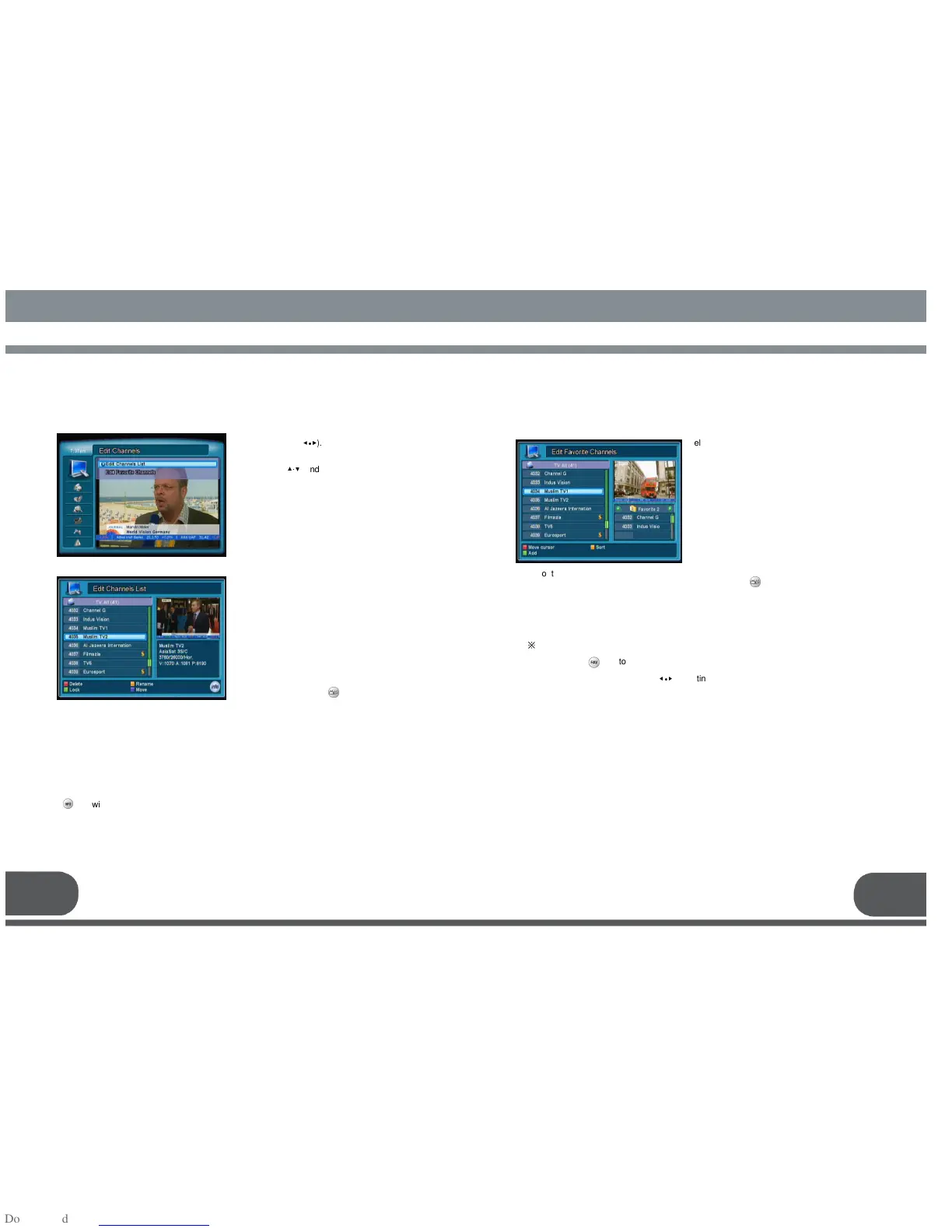
Select the Edit channels menu by using
the left/right keys(
◀∙▶
).
Move into the desired submenu by using
the up/down (
▲·▼
) and Ok key.
Press the MENU key to return to previous
menu.
7.1.1. Edit Channels List
7.1. EDIT CHANNELS
* Red: Delete channel
* Green: Lock / Unlock channel by PIN code
Once a channel is locked, every time you try to watch the program, you will be asked
to enter PIN code.
* Yellow: Rename a channel
It will show the keyboard, you can set a new channel name by using it.
* Blue: Change the position of the selected channel to an another position
* key will pop up a menu for Sort, Skip
Sort : Channels will be sorted by specific order.
Skip: A skipped channel will be marked as grey and passed while changing channels.
7.1.2. Edit Favorite Channels
- Point the cursor on the all channel list by using the Red key
- Push the Green key to add them to a favorite list
※
Tip :
- Adding a channel to several favorite lists :
Use key to select several favorite lists with OK key.
- Changing Favorite channel lists to be edited :
Use the left/right keys (
◀∙▶
), pointing the cursor on the favorite list.
[Deleting an channel from a Favorite list]
- Point the cursor on the favorite channel list by using the Red key
- Select desired channels and push the Green key to delete from a favorite list
[Other functions]
- Sort : Sort the list by Alphabetical order
- Rename Group: Rename a Favorite channel list by using the pop-up keyboard
Channels menu.
Entering into the Edit channel list, a PIN
code may be required. The factory default
PIN code is “0000”.
Edit channels; delete, lock a channel, or
edit the name of a channel etc.
To change between TV and Radio
Channel lists, push the Key.
Edit Channels menu
Entering this menu, a PIN code may be
required. The factory default PIN code is
“0000”.
Edit a favorite channel list by adding or
deleting channels.
The left list shows all available channels.
The right list shows the channels in a
favorite list.
MENU OPERATION
MENU OPERATIONMENU OPERATION
MENU OPERATION
15
8 favorite lists can be generated as Favorite1 to Favorite 8.
To change between TV and Radio Channel lists, push the Key.


 To Next Page