10 User ManualVisit the ViewZ USA website at https://www.viewzusa.com
All picture, sound sengs and setup can be adjusted in OSD (On Screen Display) menu.
To adjust the OSD screen:
1. Press the MENU buon to enter the OSD MENU
2. Press the ◄ / ► buons to select the desired main-MENU. The selected main-MENU is highlighted
3. Press the ▲ / ▼ buons to select the desired sub-MENU. The selected sub-MENU is highlighted
4. Change the value you wish to adjust by using the ◄ / ► buons
5. Press the MENU buon to conrm the adjustment on sub-MENU
6. Press the MENU buon to exit the sub-MENU and go back to the main-MENU
7. Press the MENU buon to exit the OSD MENU
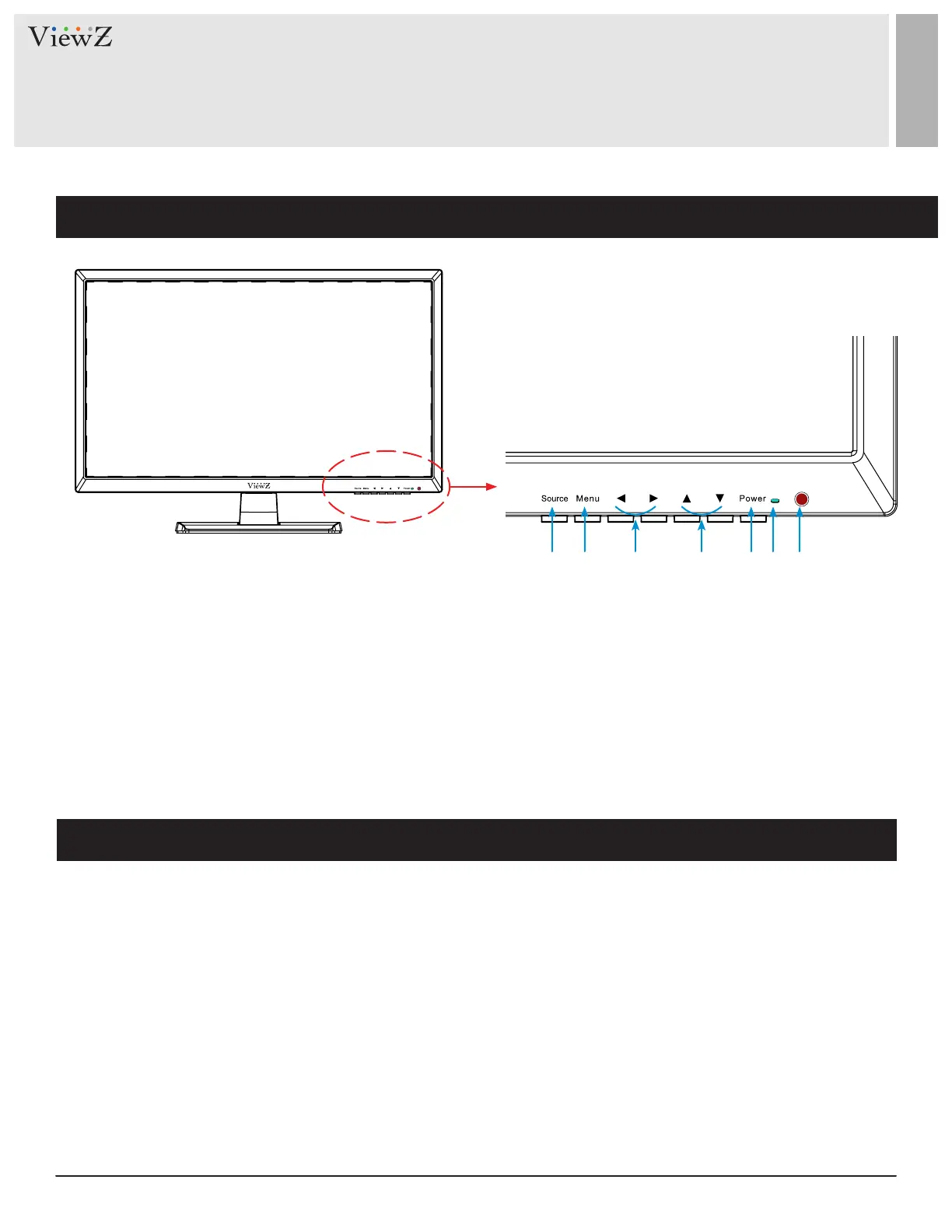
CONTROL AND FUNCTION
1. Source
Select an input source
2. Menu
Enter the MENU, save the adjustment of sub-menu
and exit the OSD
3. Le & Right ◄ (VOL) ►
Change the value on selected menu
4. Up & Down ▲ ▼
Switch a menu on OSD
On Monitor, Button Control
Monitor Button Function
5. Power
Monitor power on / o
6. LED Indicator
Blue color: monitor on
Red color : monitor o
7. IR Receiver
q w y ue r t


 To Next Page