25
Note: If the unit is to be installed ush with the
cabinets, the ush mount side trim must be
installed rst. If not, skip to “Installation”.
Step 1 - Locate the necessary parts: Two (2)
ush mount trim pieces and a hardware kit with
twenty-two (22) screws.
Step 2 - Remove the side trim on the refrigerator
and discard the trim and screws.
Step 3 - Align the top of the ush mount
side trim with the top of the unit's machine
compartment. Using the screws included in the
hardware kit, attach the side trim to the unit,
only using the holes visible through the side
trim. Note: DO NOT use the screw holes in the
machine compartment.
1
2
3
4
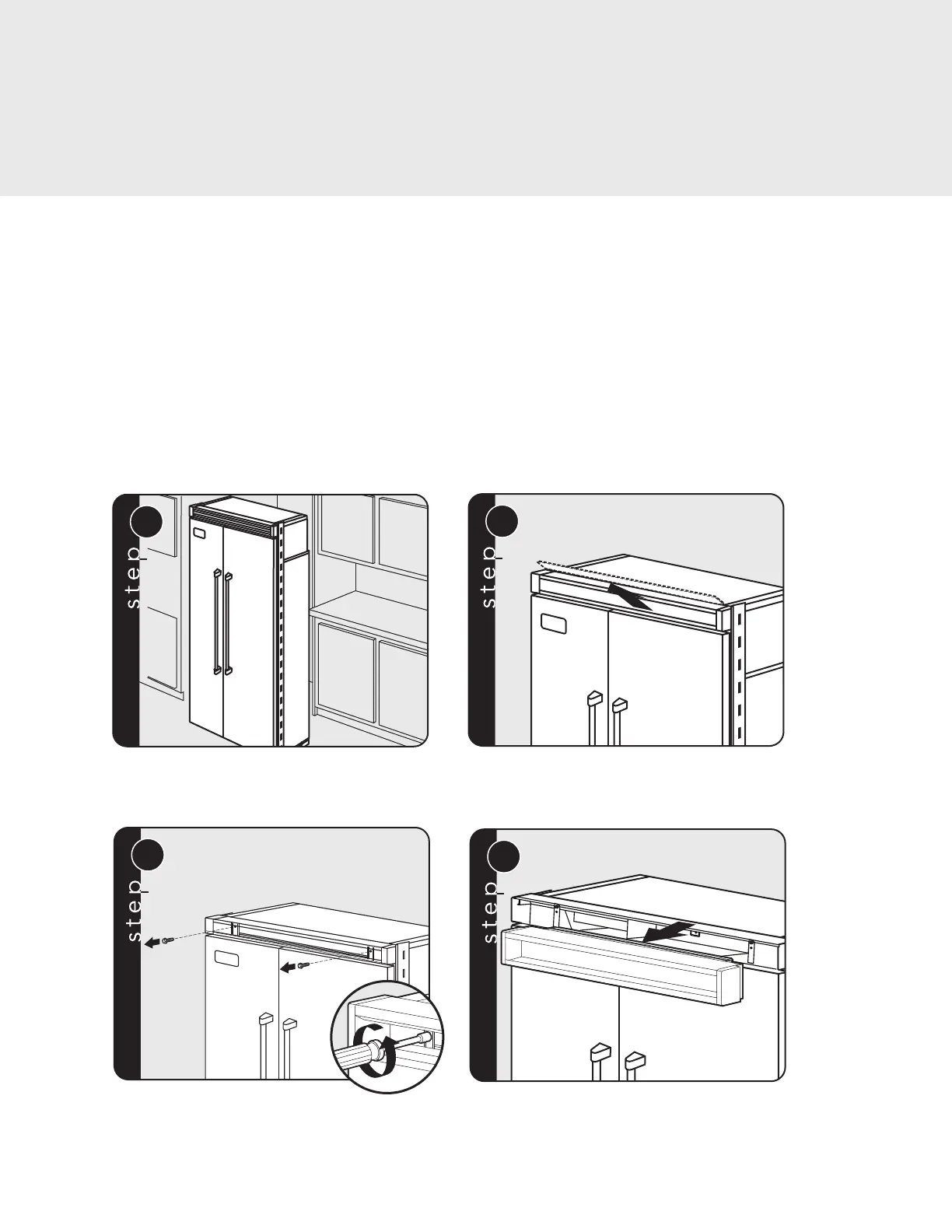
Place unit in front of cutout. Pull the center grille louver up at an angle and pull out.
Using an 8” (20.3 cm) magnetic nut driver, remove
the two 1/4” (0.6 cm) screws.
Remove grille assembly.
Installation
Flush Mount Side Trim Installation
(Sold Separately)



 To Next Page