*Keurig® and K-Cup® are registered trademarks of Keurig Green Mountain, Inc.
**Nespresso® is a registered trademark of Societe des Produits Nestle S.A. and Nestlé Nespresso S.A.
Use of the Nespresso® trademark does not imply any affiliation with or endorsement by Societe des Produits Nestle S.A.
or Nestlé Nespresso S.A.
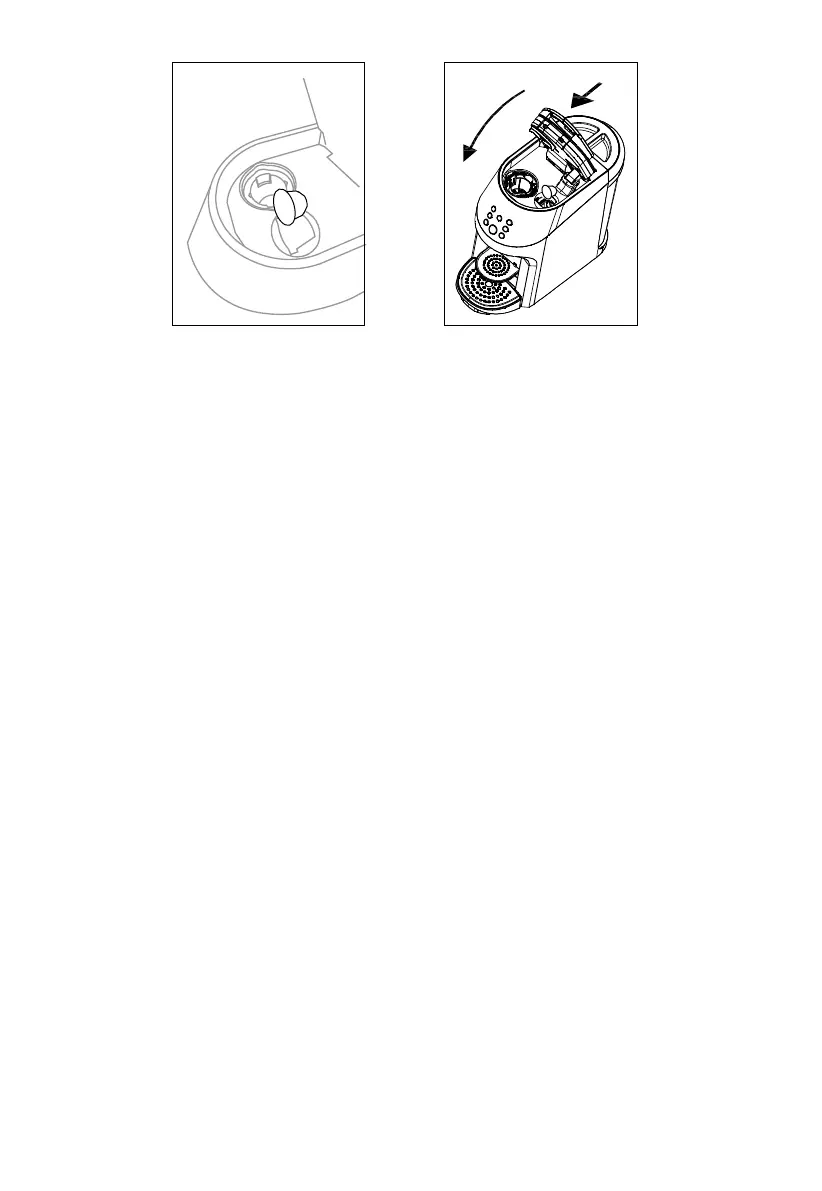
Fig.6 Fig.7
13
WARNING: Only **Nespresso® pods should be inserted in right inlet. Each side is designed
to fit only one type of pod.
Close the Pod Brew Area. Pull the Top Ring Handle down to close (see Fig.7). Once secured,
it will click. The unit will not begin the brew cycle unless this lid is fully closed.
5.
NOTE: After the machine has warmed up, all icon and coffee brew size buttons will illuminate
white. This will display 3 espresso brewing mode - Ristretto、Espresso、Lungo.
Select the icon on the right that matches your desired espresso brewing mode - Ristretto,
Espresso, Lungo.
Press the Brew Button to begin brewing. To cancel brewing at any time, push the Brew
Button again. The machine will alert you the brew cycle has been cancelled.
6.
7.
NOTE: Unit will not operate unless a brew size is selected and the lid of the Pod Brew Area
is fully closed and locked.
NOTE: Which cup amount is selected, the corresponding button light turns blue, the same
capsule type, only the last selected button light blue.


 To Next Page