Product Overview Product Overview
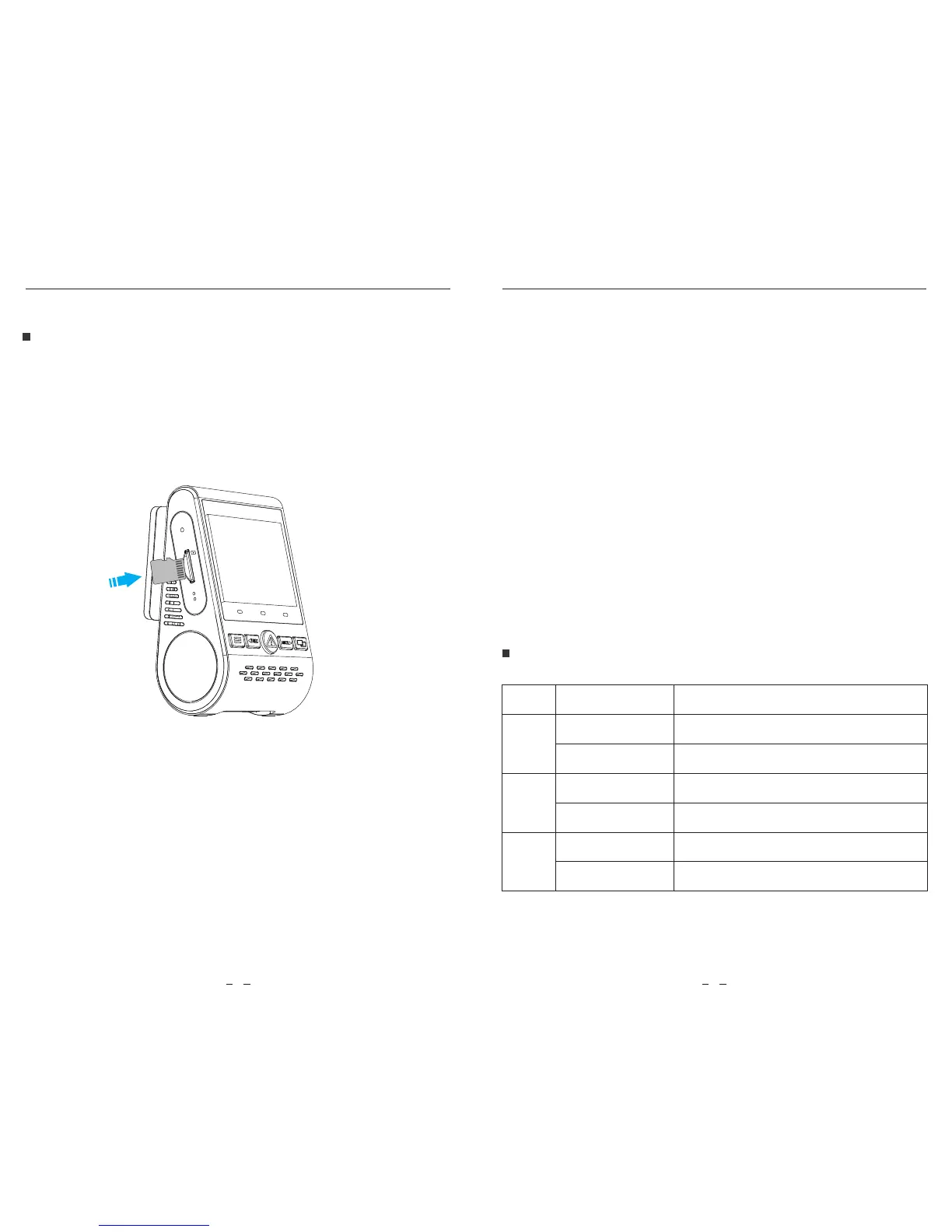
Inserting / Removing the memory card
Inserting the memory card
Removing the memory card
Formatting the card
Note:
VIOFO
5 6
Push the memory card into the card slot until you hear a click,
with the card label facing the forward (away from the screen).
Ensure that the camera is turned o / not recording, and then
push the edge of the memory card with your fingernail.
The card will spring out far enough to be removed.
The Micro SD card is sold separately. The microSD card must have a
Class-10 or UHS-I rating and the capacity up to 128GB.
64 / 128GB micro SD cards must be formatted with the FAT32 file
system, either on a computer or in the camera.
Format the card (‘Format’ option in Dash Camera ‘System settings’) to
prepare for first use in the dash camera.
Formatting will permanently erase any data on the micro SD card. For
best performance, format periodically (after backing up any important
files).
LED Indicators
LED
LED Status
Solid Red
Flashing Red
Solid Red
O
Solid Red
O
Behavior
Recording
Not recording; Updating Firmware
Wi-Fi Enabled
Wi-Fi Disabled
Microphone enabled
Microphone disabled
MIC
Wi-Fi
REC
SD
R
MIC
MicroSD


 To Next Page