SYLFIRM X User Manual(VO-UM-SFX-01)
Rev. 01 Rev. date: 2020-03-16
Uncontrolled When Printed
All Rights Reserved © 2014. VIOL Co., LTD.
Page 11 of 33
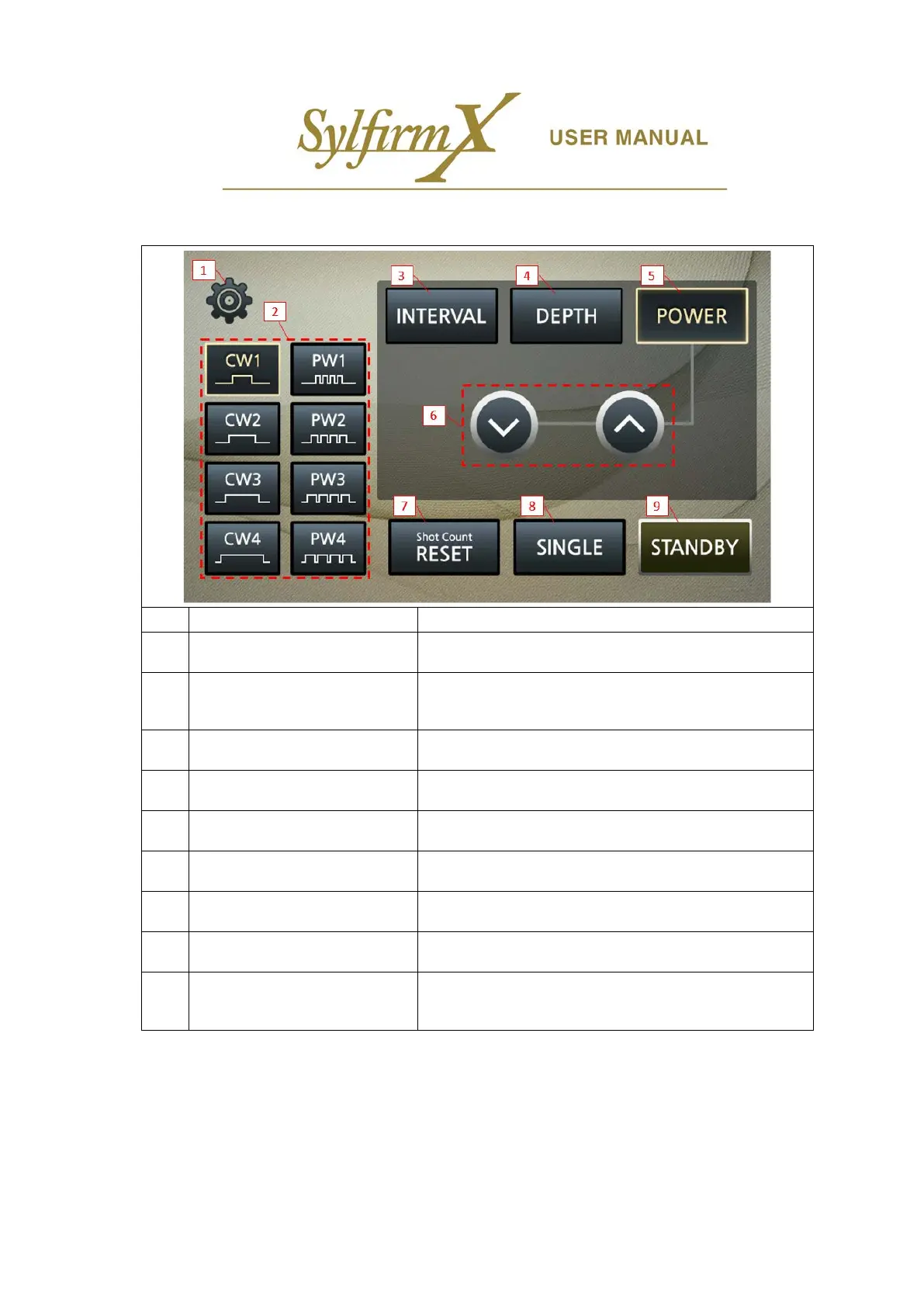
ii. Operation UI –Llower screen
1 Setup button Administrator screen activation button
2 RF output selection button
Select one of 8 types of RF output signals
Continuous Wave(CW1, CW2, CW3, and CW4) and
Pulsed Wave(PW1, PW2, PW3, and PW4)
3 Interval button
Set the interval time between motor movements in Auto
Shot
4 Depth button
Set the depth of microneedle penetration depth (0.3 ~ 4.0
mm)
5 Power button Set the RF output power level (Level 0 ~ Level 12)
6
Interval/Depth/Power control
button
Control button to increase or decrease the Interval/Depth/
Power settings
7 Shot Count RESET button Reset the total shot count number to 0
8
AUTO/SINGLE Shot Mode
selection button
Set single shot or auto shot (automatically repeated shots)
9 STANDBY/READY selection button
STANDBY button to configure all settings and READY button
for operation (configuring of settings is not available if the
READY button is activated)


 To Next Page