12
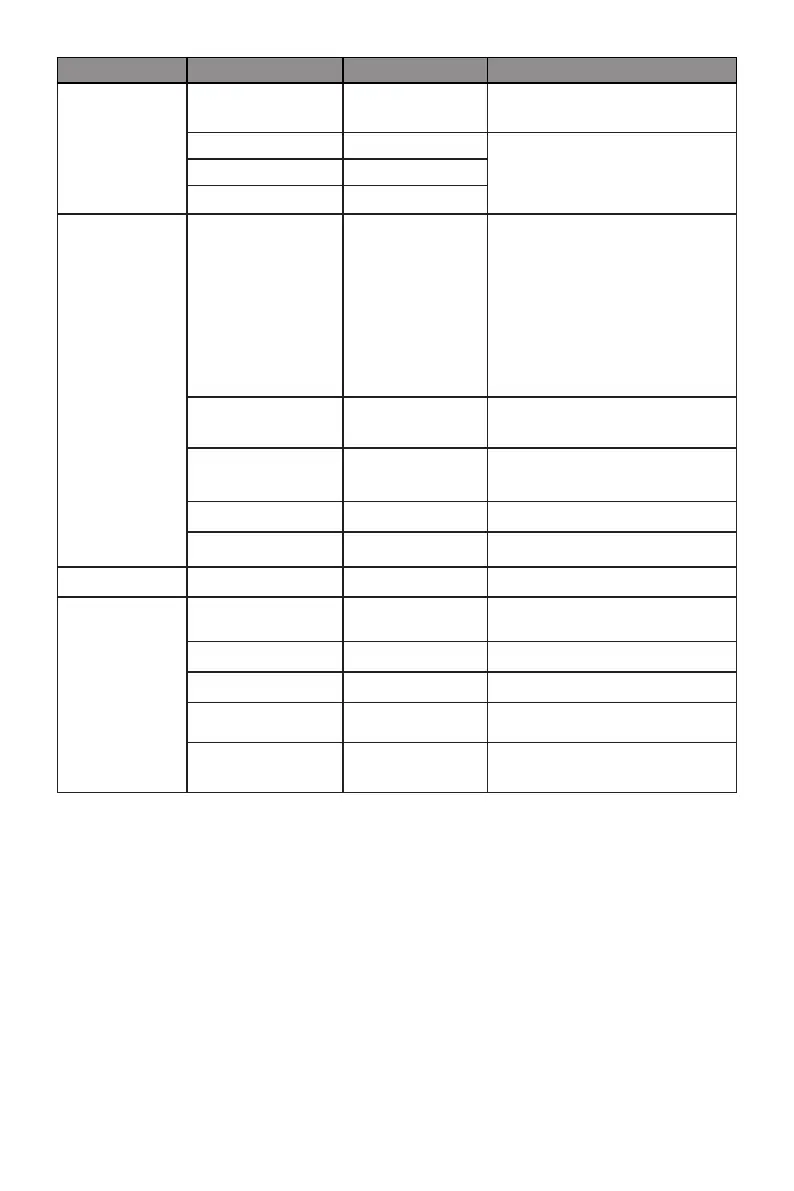
Main Menu Sub-Menu Options Description
COLOR TEMP.
COLOR TEMP.
Warm, Cool,
User
Set the display color
temperature mode
RED 0-100
Customize the display screen
RGB component according to
preference
GREEN 0-100
BLUE 0-100
OSD SETTING
LANGUAGE
ENGLISH,
FRANÇAIS,
DEUTSCH,
한국,ESPAÑOL,
РУССКИЙ,
PORTUGUÊS,
TURKCE, 简体中
文, 日本語
Set OSD language
OSD H. POS. 0~100
Adjust the OSD Horizontal
position
OSD V. POS. 0-100
Adjust the OSD Vertical
position
OSD TIMER 0~60 Adjust OSD display time
TRANSPARENCY 0-100 Adjust OSD transparency
RESET RESET None Reset monitor congurations
MISC
SIGNAL SOURCE
HDMI1, HDMI2,
DP
DP or HDMI signals input
VOLUME 0-100 Adjust audio volume
LOW BLUE RAY 0-100 Set blue light ltering level
ADAPTIVE SYNC On, Off Turn on/off Adaptive Sync
OVER DRIVER
High, Middle,
Low, Off
Set Overdrive function



 To Next Page