7
Section 4: Stand Installation
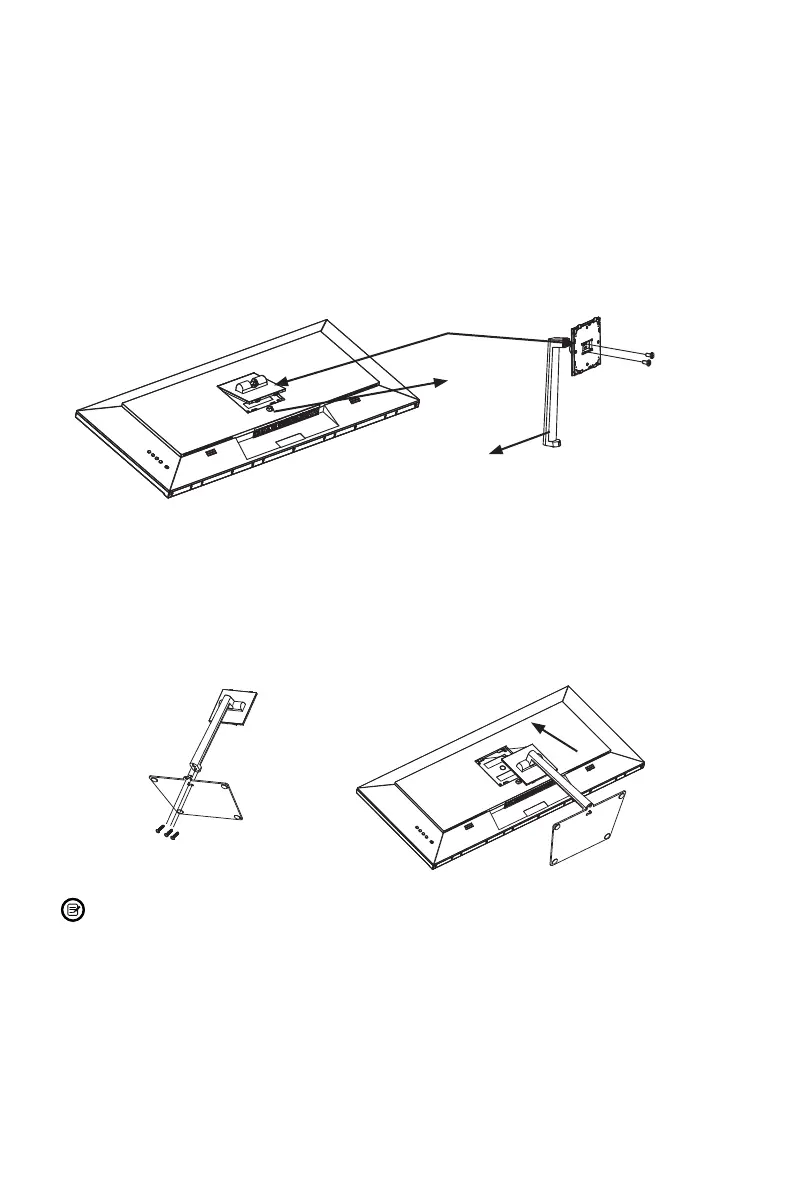
1. Open the package and take out the product with foam still attached. Gently place
it on a desktop or table.
2. Press the button at the bottom of stand plate to remove the stand plate from the
opening on the back of monitor.
3. Take out the stand and insert it into the stand plate hole, then use a screwdriver
(not included) and two NO.1 screws to fasten stand plate onto the stand.
Stand Plate
Button
Stand Stem
NO. 1 Screws x 2
4. Take out the base, use a screwdriver (not included) and three NO.2 screws to
fasten it onto the stand stem.
5. Insert the stand plate back into the opening on the back of monitor and lock it in
place.
NO. 2 Screws x 3
If needed, the stand can easily be detached from the monitor by pressing the
button at the bottom of stand plate. Gently place monitor face-down on a at
surface, then unscrew the stand to remove it.


 To Next Page