12
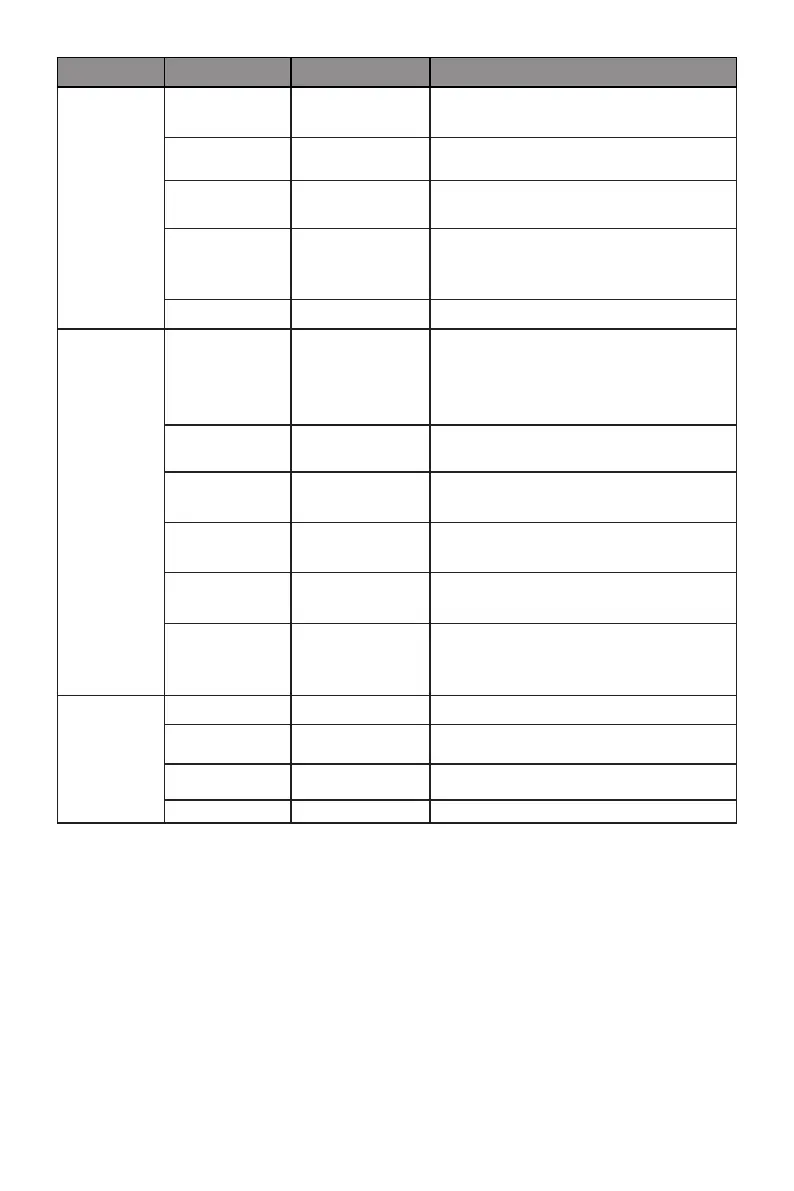
Main Menu Sub-Menu Options Description
Multi-Window Multi-Window Off, PIP Mode,
PBP 2Win
Select PIP/PBP modes according to the
number of input signals
Sub Win2 Input DP, HDMI1,
HDMI2, HDMI3
Select according to input signal for PIP/
PBP mode
PIP Size Small, Medium,
Large
Adjust the PIP/PBP display window size
PIP Position Top Right, Top
Left, Bottom
Right, Bottom Left
Adjust the PIP/PBP window position
Swap NONE Swap the PIP/PBP signal sources
OSD Language English, Español,
Русский,
Français, 한국, 日
本語, 简体中文
Set OSD language
OSD H-Position 0-100 Adjust the OSD’s horizontal position
OSD V-Position 0-100 Adjust the OSD’s vertical position
OSD
Transparency
0-100 Adjust OSD’s overall transparency
OSD Time Out 5-100 Set how long the OSD remains open after
non-use
OSD Rotation Normal, 90, 180,
270
When the user ips the display, this
function can also ip the OSD to achieve
the best display angle
Other DP Version DP1.1 Select DP version
HDR Off, On, Auto
Detect
Turn the HDR mode on/off
Adaptive-Sync On, Off Turn on/off Adaptive-Sync
Reset Reset monitor congurations



 To Next Page