© 2008 Directed Electronics- All rights reserved.
7
IMPORTANT! Never use this wire to drive anything but a
relay or a low-current input! This transistorized output can
only supply 200 mA, and connecting directly to a solenoid,
motor, or other high-current device will cause the module to
fail.
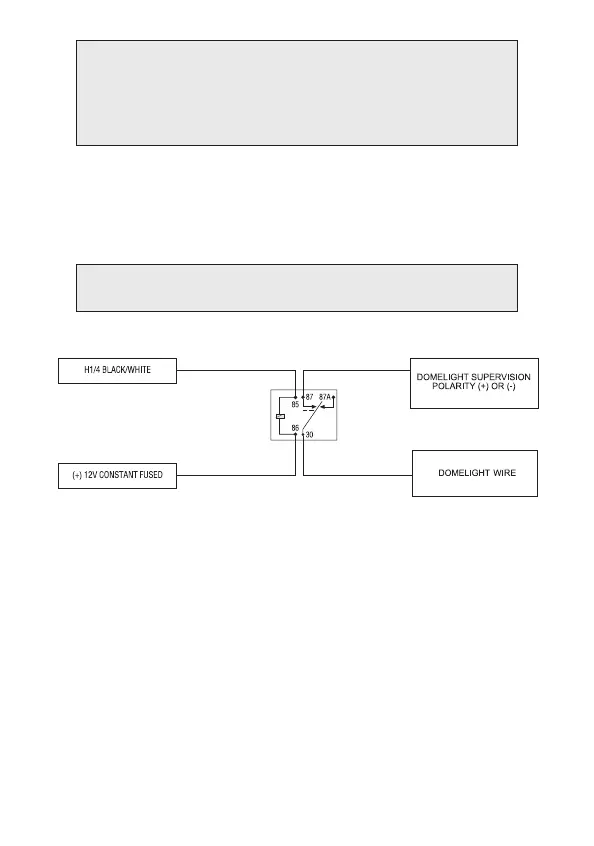
H1/4 BLACK/WHITE (-) 200 mA domelight supervision output
Connect the H1/4 wire to the optional domelight supervision relay as shown
in the following diagram:
IMPORTANT! This output is only intended to drive a relay. It cannot be connected
directly to the domelight circuit, as the output cannot support the current draw of one
or more bulbs.
H1/5 GREEN (-) door trigger input
Most vehicles use negative door trigger circuits. Connect the green wire to a
wire showing ground when any door is opened. When connecting to newer
model vehicles there is generally a need to use individual door triggers. See
DirectFax document 1076 for wiring instructions. This wire will report Zone
3.
NOTE: If using a door trigger wire that has a delay, Advanced Menu 2, feature
6 or the 998T Bitwriter can be used to turn Bypass Notification off.


 To Next Page