7
© 2013 Directed. All rights reserved.
Basic Commands (Direct Access)
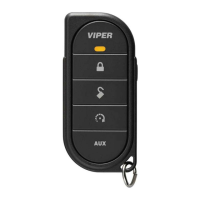
Lock
Press and release
Doors lock (if connected), the horn honks** once and the parking
lights flash one time.
To Lock and Panic
Press and hold
To lock the system, then activate Panic. For Panic to be effective,
the optional horn honk feature must be connected. Press the
or button to stop Panic output.
Unlock
Press and release
The doors unlock (if connected), the horn honks** twice and the park-
ing lights flash.
Remote Start*
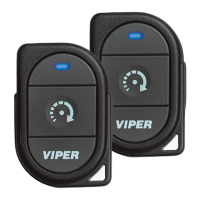
Press and release
Activates (or if On, deactivates) the remote starter. The engine turns
On, or the engine turns Off accordingly. If a Remote start configura-
tion issue prevents the engine from starting, the parking lights flash a
Remote Start fault report to identify the fault.
AUX/Trunk**
Press and hold
AUX
The Trunk opens (if connected) when button is held for 2 seconds.
* For Manual transmission vehicles see “Manual Transmission Start”.
**This is an optional feature, see your authorized Directed dealer.


 To Next Page