EasyManua.ls Logo

Viper V765 - User Manual

Viper V765
29 pages
Print Icon
To Next Page IconTo Next Page
Loading...
Question and Answer IconNeed help?

Do you have a question about the Viper V765 and is the answer not in the manual?

Summary

Introduction and Product Details

Product Specifications

Covers technical specifications and package contents of the keyboard.

Installation and Setup

Hardware and Software Installation

Guides on connecting the keyboard and installing the Viper software.

Keyboard Lighting Modes

Multi-media Keys

Explains dedicated media playback and volume controls.

Backlight Recording

How to record and save custom key lighting configurations.

Hardware Lighting Effects

Details various RGB lighting effects controllable via hardware.

Software Customization

Lighting Effects

How to set keyboard light effects, color, brightness, and speed using software.

Custom Lighting Profiles

Creating and saving custom lighting profiles and DIY color modes.

Macros and Key Assignments

Creating macros, assigning functions, and combining key outputs.

Profile Management

Creating, saving, exporting, and importing user profiles.

General Settings and Maintenance

Windows Key Lock

Disabling the Windows key during gameplay.

Factory Reset

Restoring the keyboard to its default factory settings.

Legal Information

FCC Compliance

Regulatory information regarding FCC rules and compliance.
Summary

Introduction and Product Details

Product Specifications

Covers technical specifications and package contents of the keyboard.

Installation and Setup

Hardware and Software Installation

Guides on connecting the keyboard and installing the Viper software.

Keyboard Lighting Modes

Multi-media Keys

Explains dedicated media playback and volume controls.

Backlight Recording

How to record and save custom key lighting configurations.

Hardware Lighting Effects

Details various RGB lighting effects controllable via hardware.

Software Customization

Lighting Effects

How to set keyboard light effects, color, brightness, and speed using software.

Custom Lighting Profiles

Creating and saving custom lighting profiles and DIY color modes.

Macros and Key Assignments

Creating macros, assigning functions, and combining key outputs.

Profile Management

Creating, saving, exporting, and importing user profiles.

General Settings and Maintenance

Windows Key Lock

Disabling the Windows key during gameplay.

Factory Reset

Restoring the keyboard to its default factory settings.

Legal Information

FCC Compliance

Regulatory information regarding FCC rules and compliance.

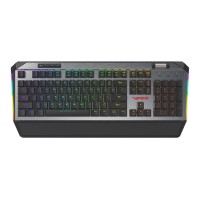
Viper V765 Specifications

General IconGeneral
BrandViper
ModelV765
CategoryKeyboard
LanguageEnglish

Related product manuals