18
9
)
Touch
3
4
5
6
Soft
Hard
Standard
Touch
Split
point
8 9
2
7
1
Beat
VOICE
R1:0
Piano
Function choosing
VOICE
R1:0
Piano
Beat: 3 meter
3
4
5
6
Soft
Hard
Standard
Touch
Split
point
8 9
2
7
1
Beat
VOICE
R1:0
Piano
Function choosing
VOICE
R1:0
Piano
Keyboard touch:Soft
STYLE SONG VOICE
STYLE SONG VOICE
STYLE SONG VOICE
STYLE SONG VOICE
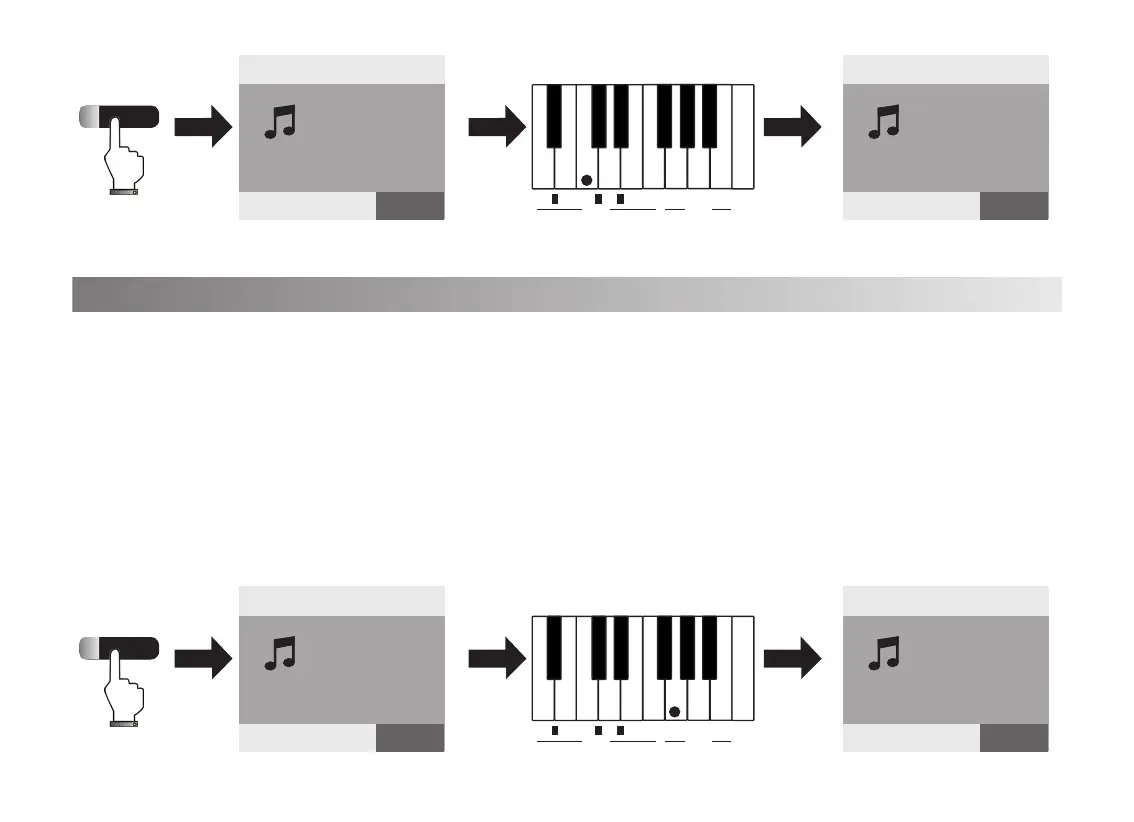
1. There are 5 touch curves, Default, Soft, Standard, Hard, Touch Off. Press[Function]button,
the indicated light is on and screen shows”Function choosing”
Press the corresponding touch key within 5 seconds, the screen shows the corresponding
touch means the keyboard touch function is activated.
2. Press[Function]button again or no operation within 5 seconds, The light is off and exit the
touch setup function.



 To Next Page
 Loading...