25
Playing with the accompaniment makes your music more expressive and emits
interest into your music
:
STYLE:
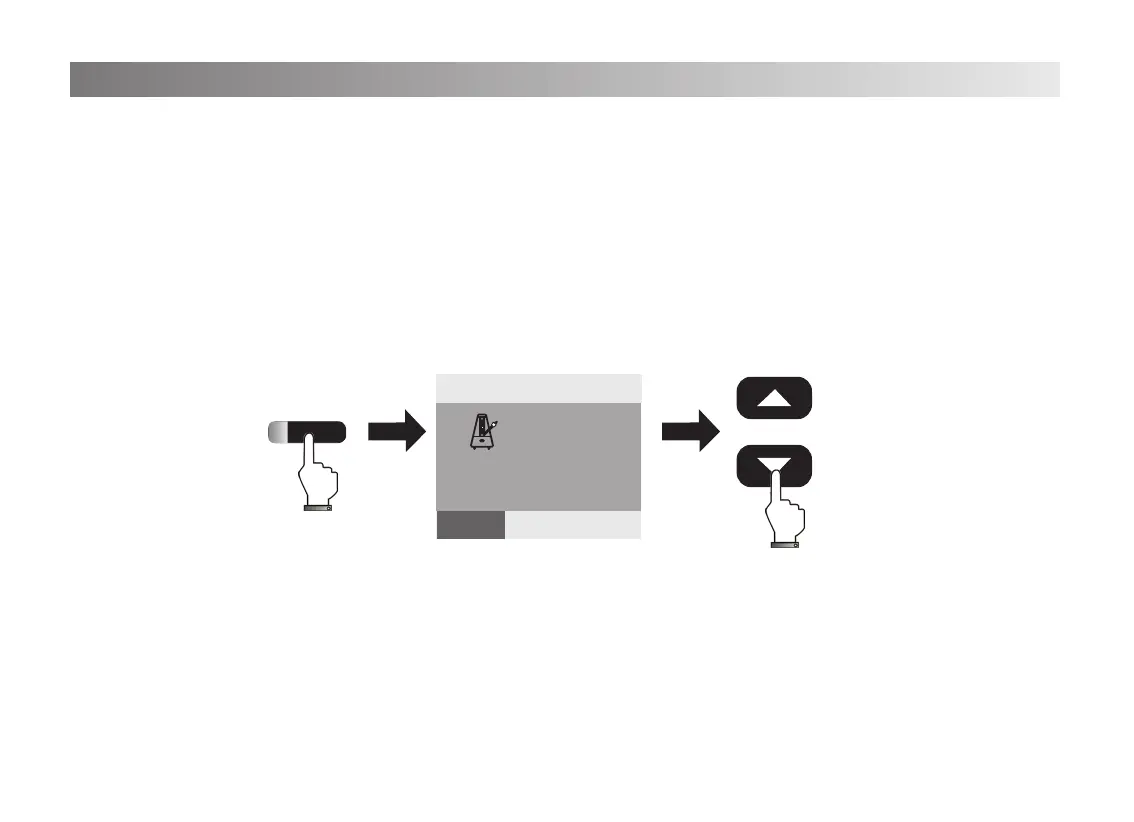
1. Press[Accomp]button, the indicated light on, the screen shows“STYLE”.
Press[Data/Tempo +/-] button to choose the rhythm, the screen will show the corresponing
name of the rhythm.
2. No operation within 5 seconds, the indicated light off and exit the rhythm function
automatically.
Accomp volume-/+:
1. Press[Accomp vol+/-] button, the screen show”20”(Default) on
the top left. When you adjust the volume by pressing the [Accomp vol+/-], it will show
corresponding gure.(Accomp volume:0-32)
2. After adjusting, the accomp volume function will be exited automatically.
Using Accompaniment
STYLE
:0
8 beat 1
STYLE
+
-
Data/Tempo
20
Tempo
=120 0
STYLE SONG VOICE


 To Next Page
 Loading...