14
Version 1.1.0
Release Date : Feb. 24, 2011
(5) AUTOSET RESET
- When set as ON and press SET KEY, it turns into AUTOSET NORMAL MODE
automatically, which means initial factory reset.
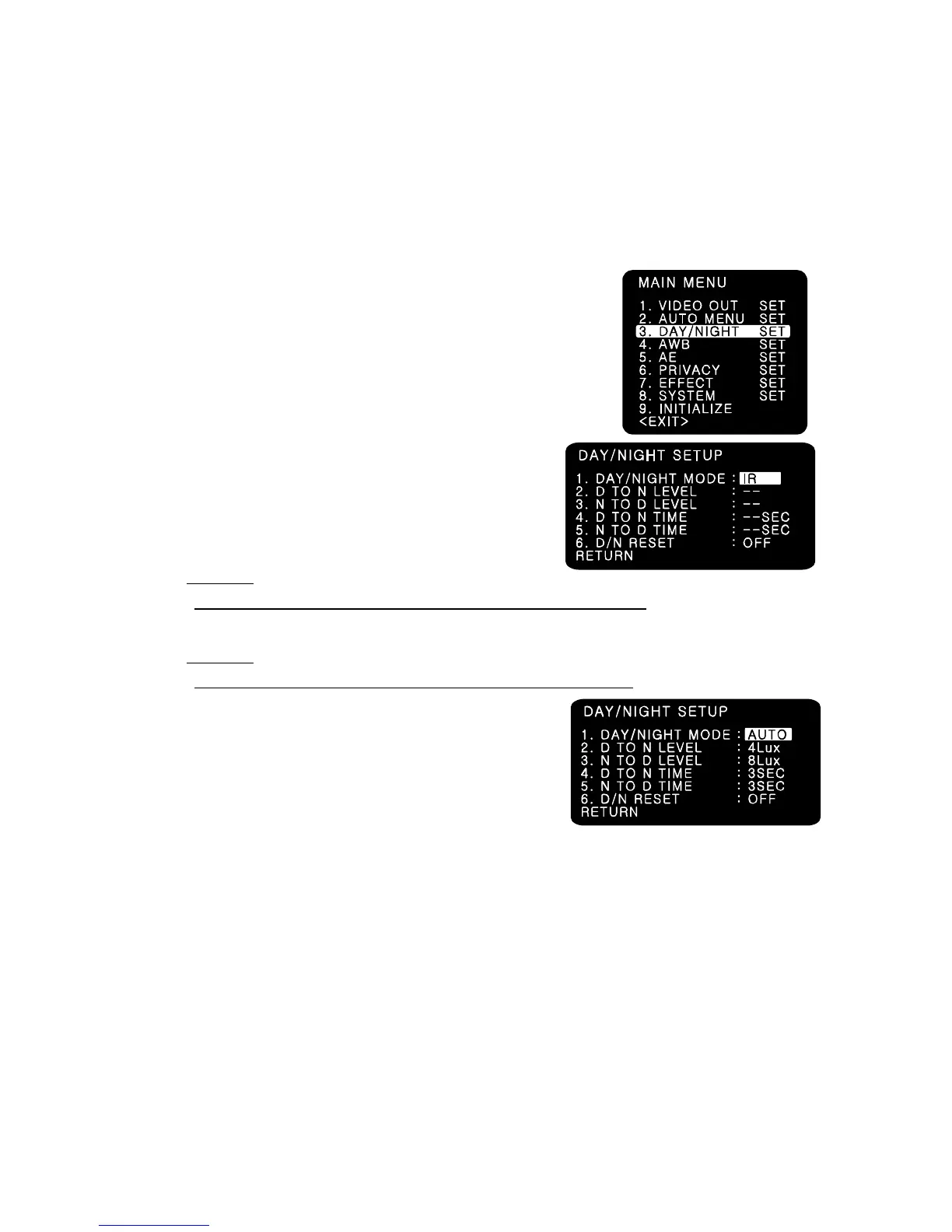
7-5. DAY/NIGHT
You can display pictures in Color/IR MODE/AUTO.
(1) DAY/NIGHT MODE
1. Please position the cursor on ‘DAY/NIGHT’ on the
SETUP menu by using the UP and DOWN selections.
2. Please select the mode you wish to operate by using the
LEFT and RIGHT selections.
- COLOR : The picture is always displayed in color.
- IR : The mode is switched to ‘DAY’ in a normal
environment, but switches into ‘NIGHT’ mode when
ambient illumination is low.
☞ NOTE
True Day & Night cameras with CDS & ICR are to be set in this mode.
- AUTO: Automatically turns between Day and Night Mode according to AGC operation.
☞ NOTE
Day & Night cameras without CDS & ICR are to be set in this mode.
(2) D TO N LEVEL
- Sets the level of illumination in which COLOR mode
is turned into B/W mode.
(This menu is not activated in case of IR MODE)
(3) N TO D LEVEL
- Sets the level of illumination in which B/W mode is turned into COLOR mode.
(This menu is not activated in case of IR MODE)
(4) D TO N TIME
- Sets the switching time from COLOR mode into B/W mode when the level of illumination has
come to D TO N LEVEL.
(Not activated in case of IR MODE)
(5) N TO D TIME
- Sets the switching time from B/W mode into COLOR mode when the level of illumination has
come to N TO D LEVEL.
(Not activated in case of IR MODE)



 To Next Page