18
Version 1.1.0
Release Date : Feb. 24, 2011
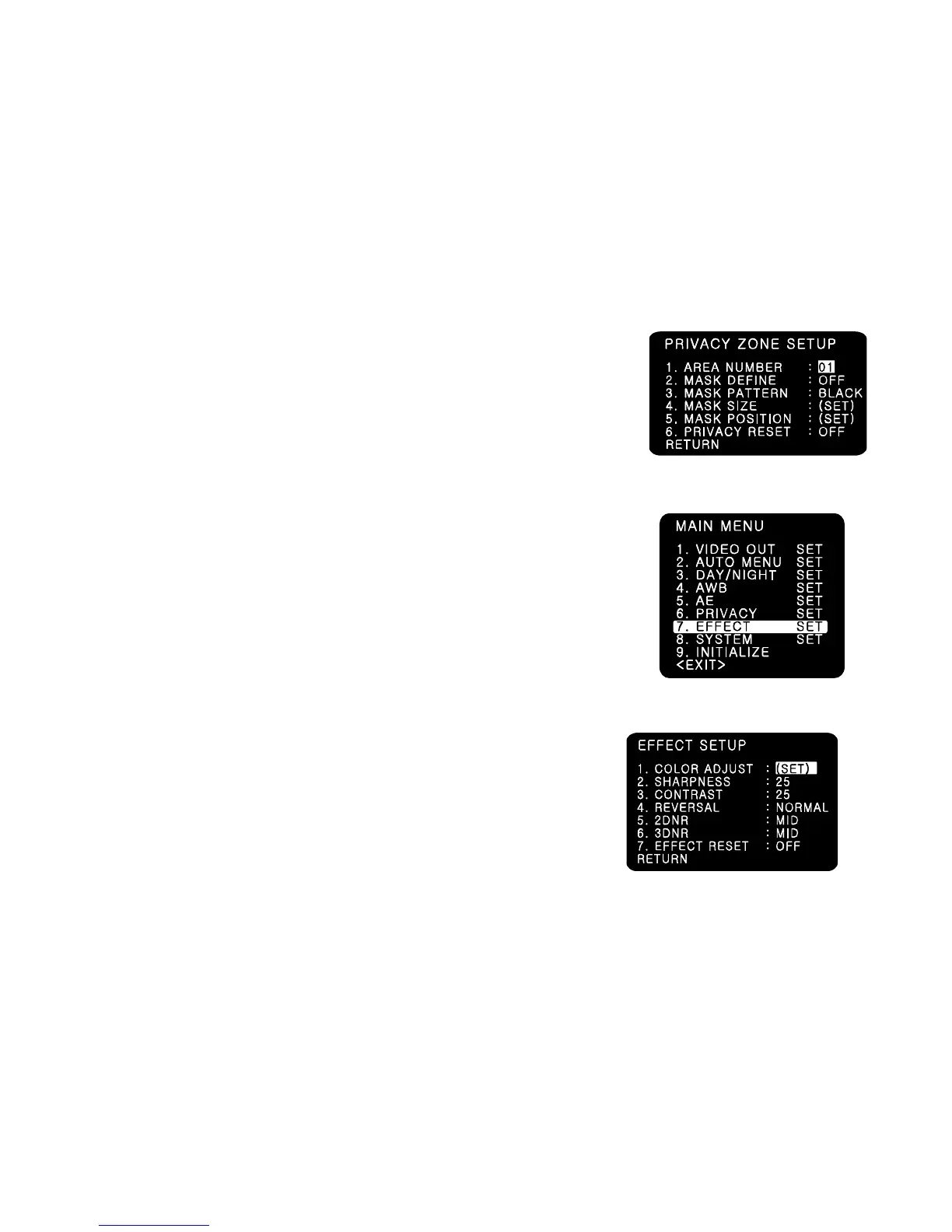
(1) AREA NUMBER: You can select up to 4 PRIVACY areas.
(2) MASK DEFINE: Determines whether to use the MASK or not.
(3) MASK PATTERN: Defines the Mask Color or type.
- 6 types of BLACK/RED/GREEN/BLUE/YELLOR/MOSAIC are selectable.
(4) MASK SIZE: By moving the cursor LEFT/RIGHT, TOP/BOTTOM, the size of masking area
can be determined..
(5) MASK POSITION: Adjust vertical and horizontal position of masking area.
(6) PRIVACY RESET
- Resets all setting of PRIVACY menu.
(7) RETURN
- Returns to the MAIN MENU.
7-9.EFFECT
(1) COLOR ADJUST
- COLOR GAIN : Adjusts the COLOR GAIN level in 00 ~ 50(Default 25)
- COLOR HUE : Adjusts the COLOR HUE level in 00 ~ 50(Default 25)
☞ NOTE
This function enables user to adjust the variation of Color Gain
on the monitor when installing camera.
(2) SHARPNESS
- Adjusts the SHARPNESS level in 00 ~ 50(Default 25)
(3)CONTRAST
-Adjusts the CONTRAST level in 00 ~ 50(Default 25)
(4) REVERSAL: Enables either normal image (NORMAL), mirrored
Image ( MIR), vertically reversed image ( VER), vertically
reversed and mirrored image( FLIP).
(5) 2DNR
- Cuts off the noise in low light condition.
4 modes of OFF/LOW/MID/HIGH are available.
☞ NOTE
Higher 2DNR level reduces more low light noise but deteriorates resolution as well.
(6) 3DNR
- Cuts off the noise in low light condition.
4 modes of OFF/LOW/MID/HIGH are available.
☞ NOTE
Higher 3DNR level reduces more low light noise but it can cause ghost effect as well.



 To Next Page