EasyManua.ls Logo

Vision SP-5000 - User Manual

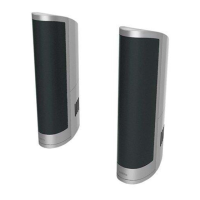
Vision SP-5000
67 pages
Print Icon
To Next Page IconTo Next Page
Loading...
SP-5000
OWNERS MANUAL
GUIDE DE L’UTILISATEUR
MANUAL DE USUARIO
GEBRUIKERSHANDLEIDING
BEDIENUNGSANLEITUNG
MANUALE DEL PROPRIETARIO
INSTRUKCJA OBSŁUGI
MANUAL DE UTILIZADOR

Questions and Answers

  • S
    Sandra MurphyAug 9, 2025
    What to do if my Vision Speakers have no sound or sound only coming out on one side?
    • C
      Curtis HarrisAug 9, 2025
      If your Vision Speakers have no sound or sound only coming out on one side, here's how to troubleshoot: 1. Bypass the faceplate inputs by plugging an audio source directly into the amplifier. 2. If the problem disappears, the fault lies with your input connections. For example, with the Techconnect Amplifier, plug an iPod into the front input, ensuring the iPod volume is at maximum. 3. If the issue remains, swap the Left and Right output connectors on the amplifier. If the side that was working changes, the problem is with the amplifier. If the same side is still the only one working, the problem is with the speaker on the other side.
  • B
    Brittany JohnsonAug 22, 2025
    How to fix hollow sound and no bass on Vision Speakers?
    • S
      smithtinaAug 22, 2025
      To resolve the issue of hollow sound or lack of bass on your Vision Speakers, check that you’ve connected the speaker cable with the correct polarity: positive-to-positive and negative-to-negative.

Summary

SP-5000 Owners Manual Introduction

Critical Safety Warnings

Provides crucial safety warnings regarding electric shock, moisture, and general electrical hazards.

Power and Cord Handling

Installation Procedures

Connecting Loudspeaker Cables

Audio-over-USB Decoder Setup

Connect USB to Decoder

Steps to connect the USB cable from the PC or module to the decoder for audio output.

Connect Decoder Audio Output

Procedure for connecting the decoder's audio output to the amplifier input.

Connect Decoder Power Input

Instructions for connecting power to the decoder, noting power requirements and conditions.

Polarity Connection Safety Warning

Crucial safety advice on ensuring correct polarity for connections to prevent product damage.

Final Assembly and Troubleshooting

Troubleshooting Sound Issues

Diagnostic steps for hollow sound, no bass, distortion, or no sound from one speaker.

Vision SP-5000 Specifications

Technical Details IconTechnical Details
frequency response90Hz-20KHz
power handling20 watts RMS
nominal impedance8 ohms
Power IconPower
USB decoder power requirementsDC, 12V, 0.5A
Weight and Dimensions IconWeight and Dimensions
height520 mm
depth170 mm
width130 mm

Related product manuals