EasyManua.ls Logo

Vision SP-800P - User Manual

Vision SP-800P
91 pages
Print Icon
To Next Page IconTo Next Page
Loading...
1
SP-800P_manual_en.doc
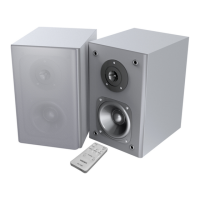
SP-800P POWERED SPEAKERS
OWNERS MANUAL
www.visionaudiovisual.com/techaudio/sp-800p/

Questions and Answers

  • C
    cory34Aug 10, 2025
    Why are my Vision SP-800P making a humming or buzzing noise?
    • B
      belinda88Aug 10, 2025
      If your Vision Speakers are emitting a hum or unwanted noise, the issue might stem from a poorly shielded cable introducing interference. To resolve this, verify that all input cables are properly shielded. Also, ensure all source devices are connected to the same power source. If the noise disappears when disconnecting a laptop from its power, this confirms the cause. You can also try disconnecting one input at a time to identify the source of the noise.
  • J
    Jesus SheaAug 16, 2025
    Why is one of my Vision SP-800P Speakers quieter than the other?
    • V
      Vincent BraunAug 16, 2025
      If the slave loudspeaker of your Vision Speakers is quieter than the master loudspeaker, the cause is likely an incorrect cable being used between them. The suggested solution is to replace the cable immediately.
  • M
    Michael AndersonAug 22, 2025
    What to do if my Vision Speakers have power but no sound?
    • K
      Krystal DavisAug 22, 2025
      If your Vision Speakers have power but aren't producing any sound, try these steps: First, increase the volume using the dial on the master loudspeaker. Next, ensure the output volume on your connected device is set to maximum and that the device's built-in speakers are functioning correctly.
  • K
    kristina78Aug 28, 2025
    How to fix Vision SP-800P Speakers with no power light?
    • R
      Ronnie WolfeAug 28, 2025
      To troubleshoot Vision Speakers with no power light, rotate the volume control clockwise. Then, check the power source and power input cable. Finally, inspect the fuse in the power cable plug.
  • M
    Matthew HicksSep 3, 2025
    How to troubleshoot a Vision Speaker when the slave loudspeaker isn't working?
    • S
      Sarah HaneySep 4, 2025
      If the slave loudspeaker of your Vision Speakers isn't working or seems quieter than usual, check the speaker cable to ensure it's properly connected at both ends.

Summary

Vision SP-800 P Powered Speakers Owners Manual

Declarations and Safety Warnings

Safety Warnings

Safety precautions regarding electric shock, fire, and moisture exposure.

Installation Procedures

Mounting Brackets to Wall

Instructions for securely fitting brackets to walls or ceilings using appropriate screws.

Install Power and Input Cables

Guidance on running power and input cables from source locations to the master unit.

Install Speaker Cable

Instructions for running speaker cables, including cable gauge recommendations.

Connecting Loudspeakers

Troubleshooting Guide

Product Specifications and Details

Warranty and Legal Disclaimers

Lifetime Return-to-Base Warranty Details

Explanation of the lifetime warranty, coverage, conditions, and claim procedures.

Vision SP-800P Specifications

General IconGeneral
BrandVision
ModelSP-800P
CategorySpeakers
LanguageEnglish

Related product manuals