Visioneer
®
Rabbit™ PC30dwn Printing
42 User Guide
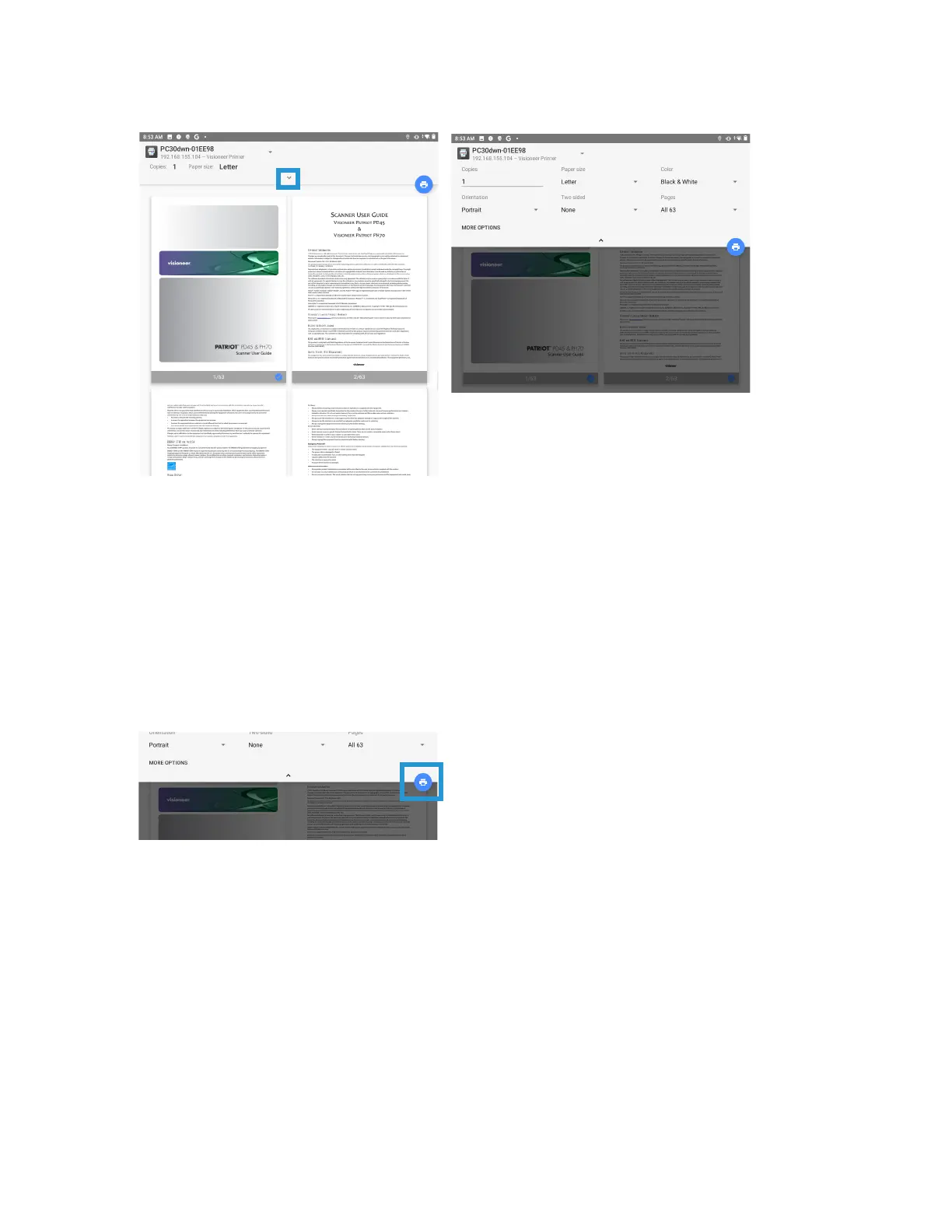
3. Ensure all the pages desired for printing are selected.Tap the Show More icon for additional settings.
Copies — print multiple copies of the document.
Paper size — this will resize the text/images on the page to the paper selected size. For best results,
the paper size should match your document’s and/or the paper size that is currently in the paper tray.
Color — allows you to print your document using the toner saving mode.
Orientation — invert makes each image pixel inverted to its complementary color. For example: the
original black text on white background becomes white text on black background.
Two-sided — have the document printed on both sides of the paper.
Pages — select All to print every page or specify the pages to print.
4. Observe the settings are correct. Tap the Print icon.
PRINTING FROM YOUR iOS MOBILE DEVICE
See Installing The Mobile Application to ensure AirPrint is available and ready on your iOS device.


 To Next Page