Screen orientation:
For the best viewing performance, according different holding way, the screen will automatically changes
orientation to portrait or landscape format , You can disable automatic screen rotation and lock screen in
portrait Or landscape mode.
Note : Some applications may not support automatic screen rotation , designed to be used only in one
direction.
Lock screen orientation
1change screen to the desired direction
2 Swipe from the right edge of the screen to access the super button icon.
**3 touch settings screen .
**4 touch , switch to locked screen orientation.
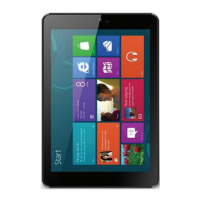
Windows 8 initiate screen
Windows 8 initiate screen show a list of default and custom dynamic magnetic sticker, which is used to point
to Mail , Windows Explorer, weather app ,calendar , Windows shops, Internet Explorer and other installed
applications shortcut icon.
Windows 8 initiate screen will update real-time news sports new, weather report, some social networking
services news and so on.
User interface based on magnetic stickers let you directly access recently used applications , e-mail ,Photos,
music , videos , contacts , social networking updated and frequently visited sites. You can customized the start
screen according yourself favorite.
You also can add your favorite pictures as wallpaper, personalize the start screen.
** Note : The dynamic magnetic stickers can be xed to the task-bar by using xed to the Start menu, and it
can be added or deleted by unpinning option.
L’orientation de l’écran:
Pour une meilleure performance visonelle, vous pouvez changer la façon que vous tenez l’appareil, l’écran
change automatiquement l’orientation. Vous pouvez désactiver la rotation automatique de l’écran et l’écran de
verrouillage en mode portrait ou paysage.
Remarque: Certaines applications ne peuvent pas soutenir la rotation automatique de l’écran, conçu pour être
utilisé dans une seule direction.
Verrouillage orientation de l’écran
1changer l’écran à l’deriction souhaitée
2 Glissez au bord à la droite de l’écran pour accéder à l’icône du bouton de super.
**3 réglages tactiles écran .
**4 toucher , passer à verrouillée orientation de l’écran.
Initier l’écran Windows 8
L’écran initier de Windows 8 montre une liste de défaut personnalisé, qui est utilisé pour pointer vers e-mail,
“Windows Explorer”, application météo, calendrier, des boutiques de Windows, Internet Explorer et d’autres
applications installées.
L’écran mettra à jour, en temps réels, la météo, certaines nouvelles sociale et ainsi de suite.
L’Interface vous permettent d’accéder directement à des applications récemment utilisées, e-mail, photos,
musique, vidéos, contacts, les réseaux sociaux et les sites fréquemment visités. Vous pouvez personnaliser
l’écran de démarrage selon vos favori.
Vous pouvez également ajouter vos photos préférées comme fond d’écran, personnaliser l’écran de
démarrage.
10
10


 To Next Page