Parts
Parts Function
————————————————————————————————————————————————————————————————————————
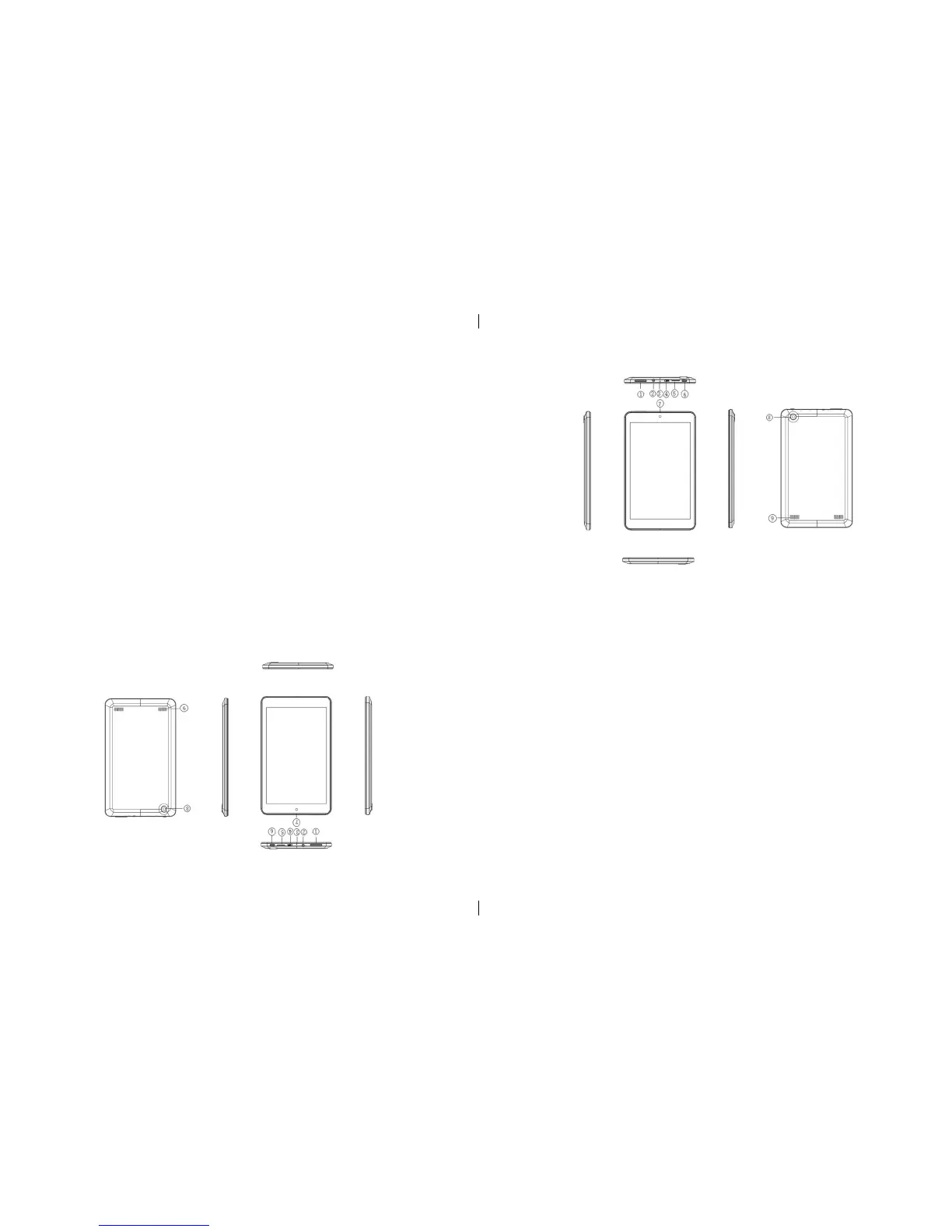
1 Volume buttons • Press to increase/decrease the volume
————————————————————————————————————————————————————————————————————————
2 Audio port (3.5 mm) • SA Connect a headset, headphones, microphone,
• or other audio device to listen to Stereo, record audio or call
————————————————————————————————————————————————————————————————————————
3 Microphones • You can record sound around the same time for video cameras
————————————————————————————————————————————————————————————————————————
4 Micro-USB port •.Connect the power adapter which came with the Tablet PC to
supply power and to charge the battery.
• Through the optional USB Portable (OTG) encryption dog USB
device, used to transfer data, music, photos, videos, ext.
————————————————————————————————————————————————————————————————————————
5 TF card slot • Insert TF card, you can identify the le within TF
————————————————————————————————————————————————————————————————————————
6 The power button • Hold to open or close the tablet PC.
• Press to open or close the display.
————————————————————————————————————————————————————————————————————————
7 Front camera • Take a picture or video from Front view.
• Make video calls.
————————————————————————————————————————————————————————————————————————
8 Rear camera • Take a picture or video from Front view.
• Make video calls.
————————————————————————————————————————————————————————————————————————
9 Speakers • output audio
————————————————————————————————————————————————————————————————————————
Pièces
Pièces Fonction
——————————————————————————————————————————————————————————————————————————————————————————————————————————
1. Boutons de volume • Appuyez pour augmenter / diminuer le volume
——————————————————————————————————————————————————————————————————————————————————————————————————————————
2. ports audio (3,5 mm) • SA Connect un casque, des écouteurs, microphone,
•
ou autre appareil d’audio pour écouter en stéréo, enregistrement audio ou un appel
——————————————————————————————————————————————————————————————————————————————————————————————————————————
3. Microphones • Vous pouvez enregistrer des sons aux même temps pour les caméras vidéo
——————————————————————————————————————————————————————————————————————————————————————————————————————————
4. Ports Micro-USB • Connecter l’adaptateur qui est fourni avec la Tablet PC, au bloc d’alimentation pour charger la
batterie.
——————————————————————————————————————————————————————————————————————————————————————————————————————————
5. TF carte fente pour carte • Insérer la carter TF, vous pouvez identier le chier au sein du TF
——————————————————————————————————————————————————————————————————————————————————————————————————————————
6 . Le bouton d’alimentation • Appuyez sur le bouton pour ouvrir ou fermer la tablette PC
• Appuyez sur pour ouvrir ou fermer l’écran.
——————————————————————————————————————————————————————————————————————————————————————————————————————————
7. Caméra frontale • Prendre une photo ou une vidéo du vue d’avant.
• Faire des appels vidéo.
——————————————————————————————————————————————————————————————————————————————————————————————————————————
8. Caméra de recul • Prendre une photo au une vidéo du vue d’avant.
• Faire des appels vidéo.
——————————————————————————————————————————————————————————————————————————————————————————————————————————
9. Haut-parleurs • audio de sortie
——————————————————————————————————————————————————————————————————————————————————————————————————————————
3
3


 To Next Page
 Loading...