16
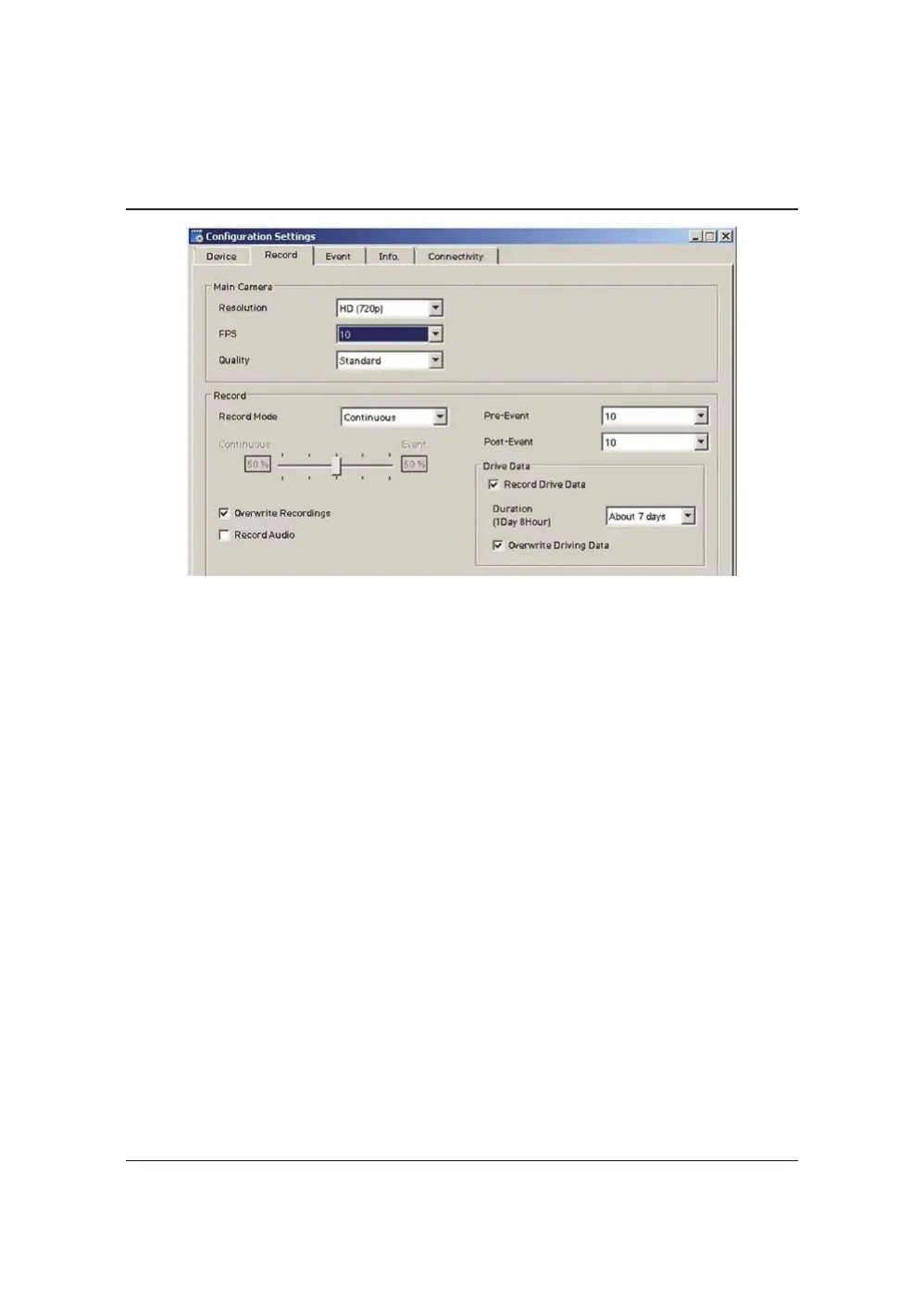
RECORDSETTINGS
Resolution
VGA(640x480),720P(1280x720),1080pHD(1920x1080).
FrameRate
Adjusttheframeratefrom30fps,15fps,10fps,5~1fps
Quality
AdjustthepicturequalityfromStandard,High,Super
RecordMode
Event(AutomaticallystartsrecordingbyG‐sensororPanicbutton.)
Continuous(AlwaysrecordingwhenpoweredbyDC12/24V.)
Dual(Thecontinuousrecordfpsis1fpsandEventrecordwillwork
accordingtotheFpssetting.)
OverwriteRecordings
ThisfunctionallowstheunittooverwriteoldfilesontheSDCard
automatically.Youcanoverwritethecontinuous,panicorG‐Sensor
recordedfiles.
Pre‐Event/Post‐Event
AdjustthePre/PostEventtimefrom5secondsto20seconds
DriveData
GPSdata&G‐Sensordatawillberecordedwithvideosandatthesame
time,GPSdata&G‐Sensordatawillberecordedseparately,wecallit
as‘Drivedata(drv file)’.
AdjustDriveDatadurationfrom“about1day”to“about30days”.


 To Next Page