09100 Issue 1
7Page of 36
ENG
ALPHA Touch - Instructions for Use
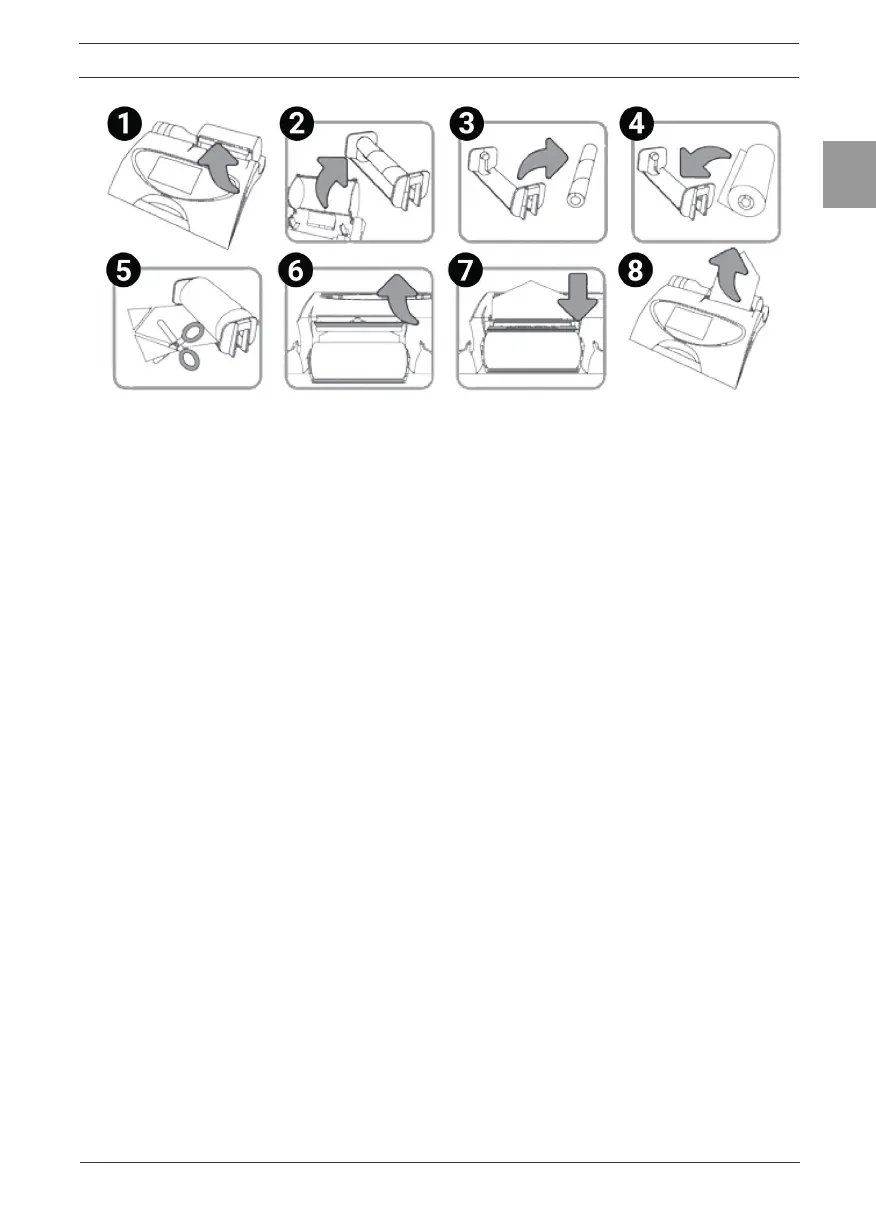
Figure 3 – Fitting a new paper roll.
Warning: The paper tear bar has sharp edges. Take care not to cut ngers.
3. Operating Instructions
Turn on the ALPHA Touch (The On/Off switch is at the back of the device).
3.1. Entering Subject Data
When the device is turned on, the Main Menu screen is displayed.
1. Select a subject by tapping the ‘Subject’ button onscreen.
2. List the subjects saved on the device by selecting either the Name or ID
tab.
3. View the subject details by tapping the subject onscreen. This will
select the subject from the database. Select Enter to make this the
current subject.
4. To create a new subject, select the New tab. Touch the required eld
onscreen to highlight, then enter the subject details using the touch
panel keypad. Press the ‘Enter’ button to save the subject to the
database and return to the Home Menu.
Note: The current subject surname and forename will be displayed on
the bottom left hand corner of the screen.
• If the subject name is not entered then the subject ID will be displayed.
• If the subject has test session results associated with it then the
subject name and ID will appear in black.
• If there are no test session results then the subject name and ID will
appear in grey.
3.2. Conducting a Test
Before starting a test session:
1. Ensure that the accuracy of the device was checked recently. (Refer to
section on Checking Accuracy).


 To Next Page