2 MicroLinks Technology Co., Ltd.
1. Products Introduction
1.1 Packing Contents
Objects packed inside the box include one host and nine fittings as
follows. Please charge the lithium battery for 6 to 8 hours for the
first time. SD Card has been installed inside the host. Please refer
to item (4) of Section 1.5 for dismount.
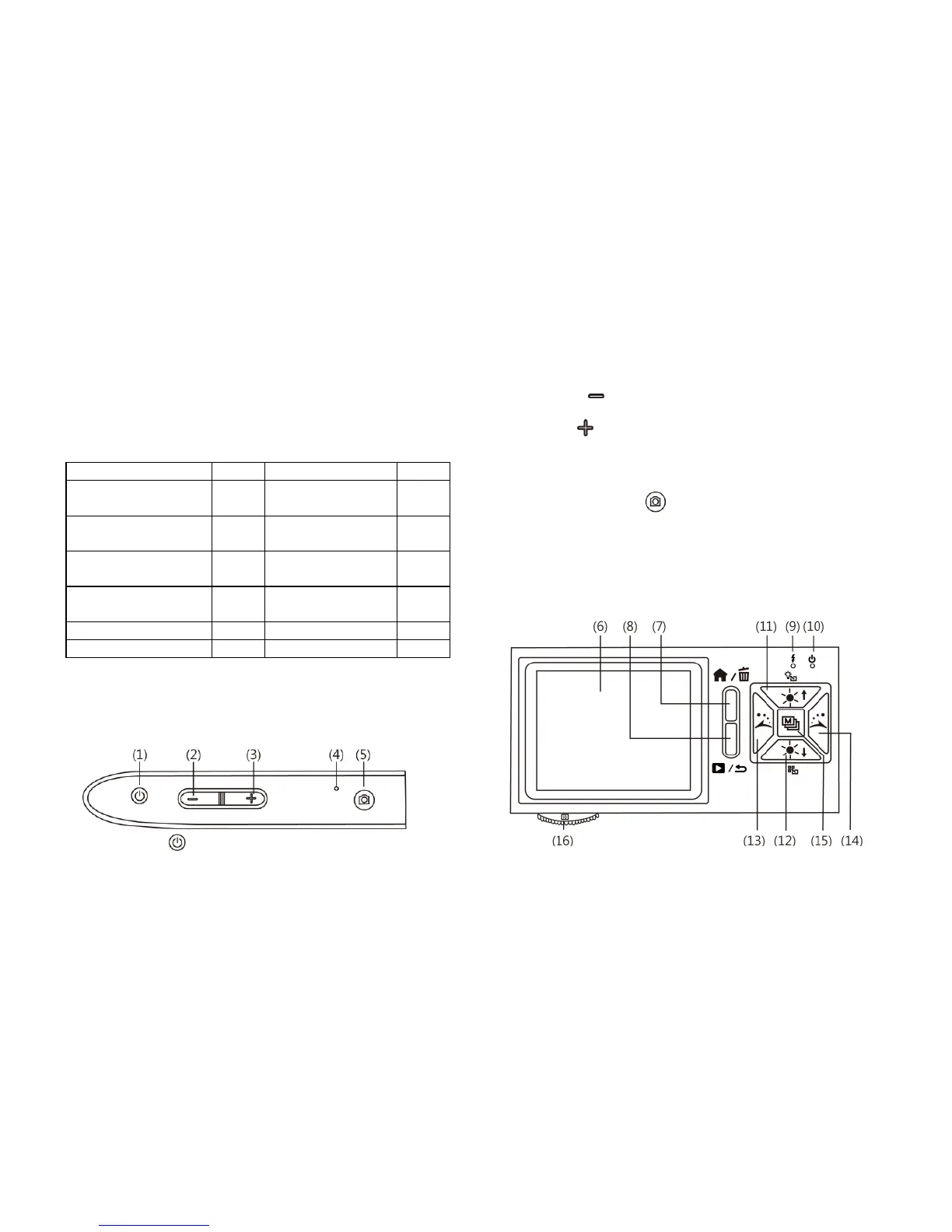
1.2 Functions of Microscope
Microscope appearance is composed of buttons, transmission and
storage interfaces. For the functions of interfaces, please refer to
the following contents:
(1) Power Supply : press the button for two seconds to switch
on the machine, and press the button again to switch off the
machine.
(2) Zoom Out : the button is applied to zoom out digital image
[please refer to (H) and (I) of item (1) of Section 1.4].
(3) Zoom In : the button is applied to zoom in digital image.
(4) RESET Hole: in case that the machine stops (which means no
reaction in the image by pressing any button), insert slender
clip into the hole to trigger the RESET button.
(5) Camera/Video REC : the button is applied to photograph in
observing mode [please refer to item (1) of Section 1.4]. Press
the button for a long time to enter Comparison mode. In the
mode of Video Play, it can open files [please refer to item (2)
of Section 1.4]. In Video REC mode [please refer to item (3)
of Section 1.4], the button is used to start record video and
stop recording after pressing it again.



 To Next Page