16 MicroLinks Technology Co., Ltd.
2. Program Installation
For detailed program installation, please refer to the Manual set in
the Installation CD (User’s Manual\English\Installing PRO10
Device Operates Manual). Programs shall be installed according to
the following 4 steps:
2.1 Insert Installation CD (Step 1)
Insert Installation CD provided together with the product into
CD-ROM Drive. The CD will be read by computer automatically,
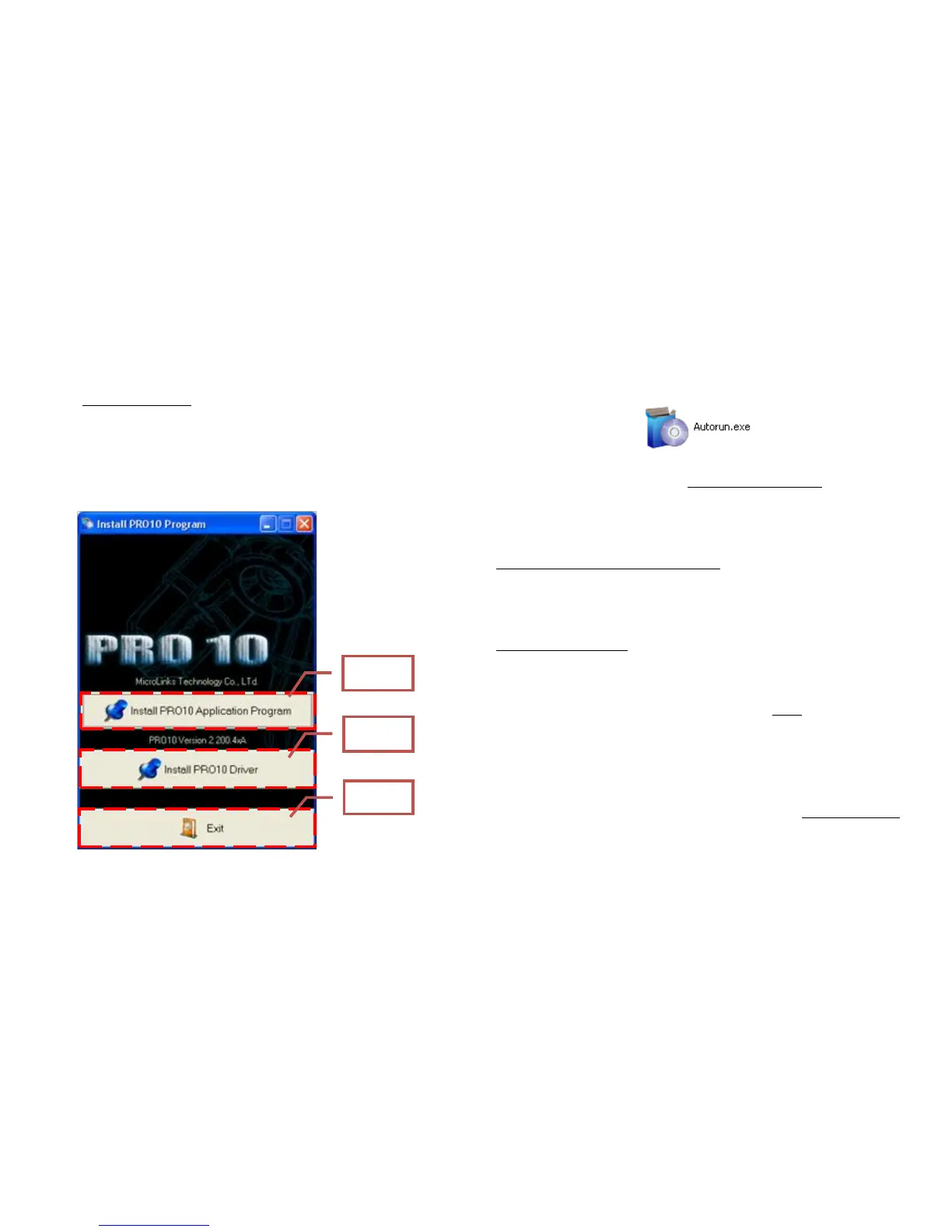
and the installation window will be displayed:
If the computer does not display installation window, please open
the Installation CD and select Autorun.ext as illustrated in the
following image:
If the Installation CD provided together with the product is lost or
unknown damaged, please visit http://www.vitiny.com to download
installation files.
2.2 Install Application Program (Step 2)
Please click and select the position of Step 2. Press button of
Install PRO 10 Application Program to install PRO 10 Application
Program.
2.3 Install Driver (Step 3)
Please click and select the position of Step 3. Press button of
Install PRO 10 Driver to install PRO 10 driving program.
2.4 Quit Installation Program (Step 4)
After installing Application Program and Driver, please click and
select the position of Step 4. Press button of Exit to quit image of
program installation.
3. Operate Application Program
Operation Instruction of Application Program is composed of 5
parts about primary operation functions. For detailed contents,
please refer to the Operation Instruction set in the Installation CD
(User’s Manual\English\PRO 10 Application Program Operation
Manual).



 To Next Page