Getting Started 5
Getting to Know the Panel
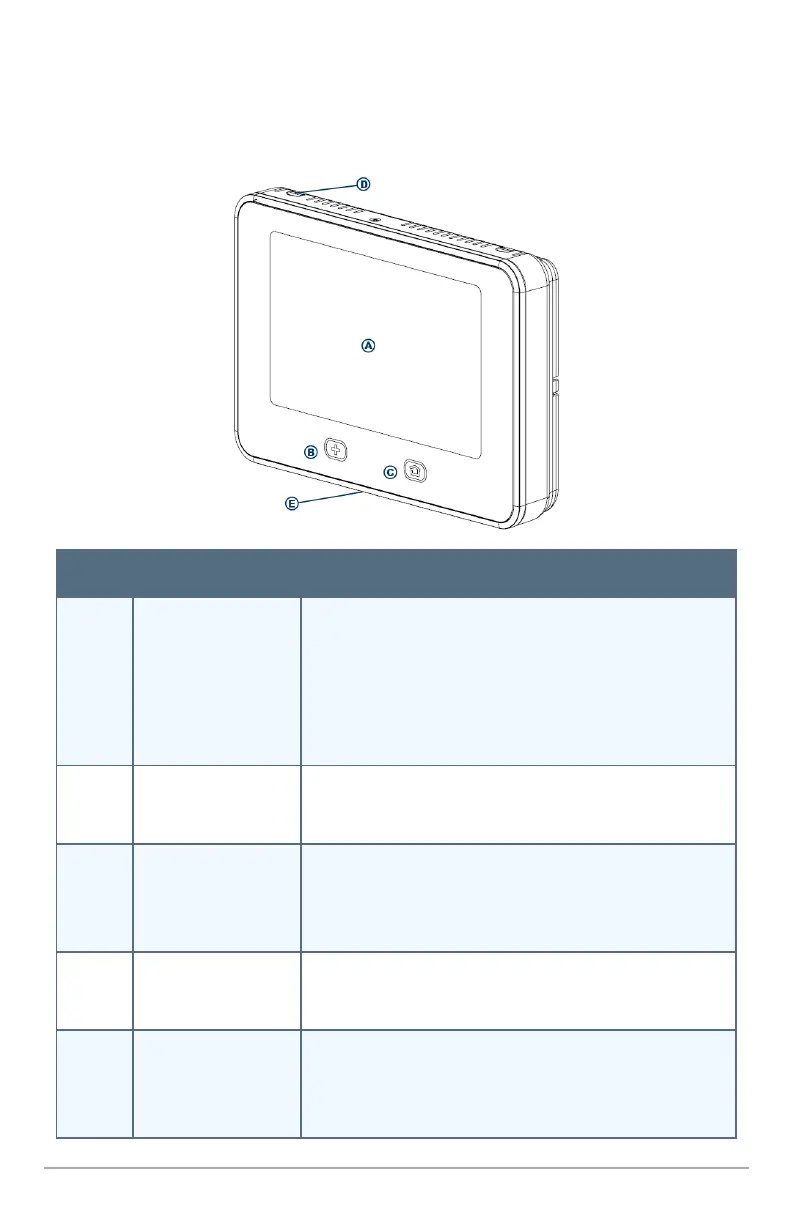
ThissectiondescribestheVivintSkyControlPanelfeatures.
Callout Feature Description
A Color Display with
Touchscreen
Showssysteminformation,status,configurationscreens;
andfunctionsasthepanel'sinteractivetouchscreen.For
informationoncustomizingthedisplay,andcalibratingand
cleaningthetouchscreen,see"SystemCustomizationand
Tools"onpage28.
B Emergency
Button / Indicator
Buttonwillglowwhitewhenthesystemisenabledforemer-
gencyalarms.Flasheswhiteduringemergencyalarms.
C Home Button /
Indicator
Showsthesystemstatus(seethelistbelowfordescriptions
ofthesystemstatusasdisplayedbytheHomebutton),and
returnsyoutotheHomescreenwhenpressed.
D Microphone Usedfortwo-wayvoicecommunicationwiththeVivintCen-
tralStation.
E Alarm Siren and
Speaker
Soundsallsystemalarms,systemsounds,voiceprompts,
andaudiofortwo-wayvoicecommunicationwiththeCentral
Station.


 To Next Page