8 Getting Started
Status Icons
Thebottomofthepaneldisplayisthestatusareathatshowsthefollowingsysteminformation:
n Currentmode
n Sensorstatus
n Currenttroublealerttext(ifany)
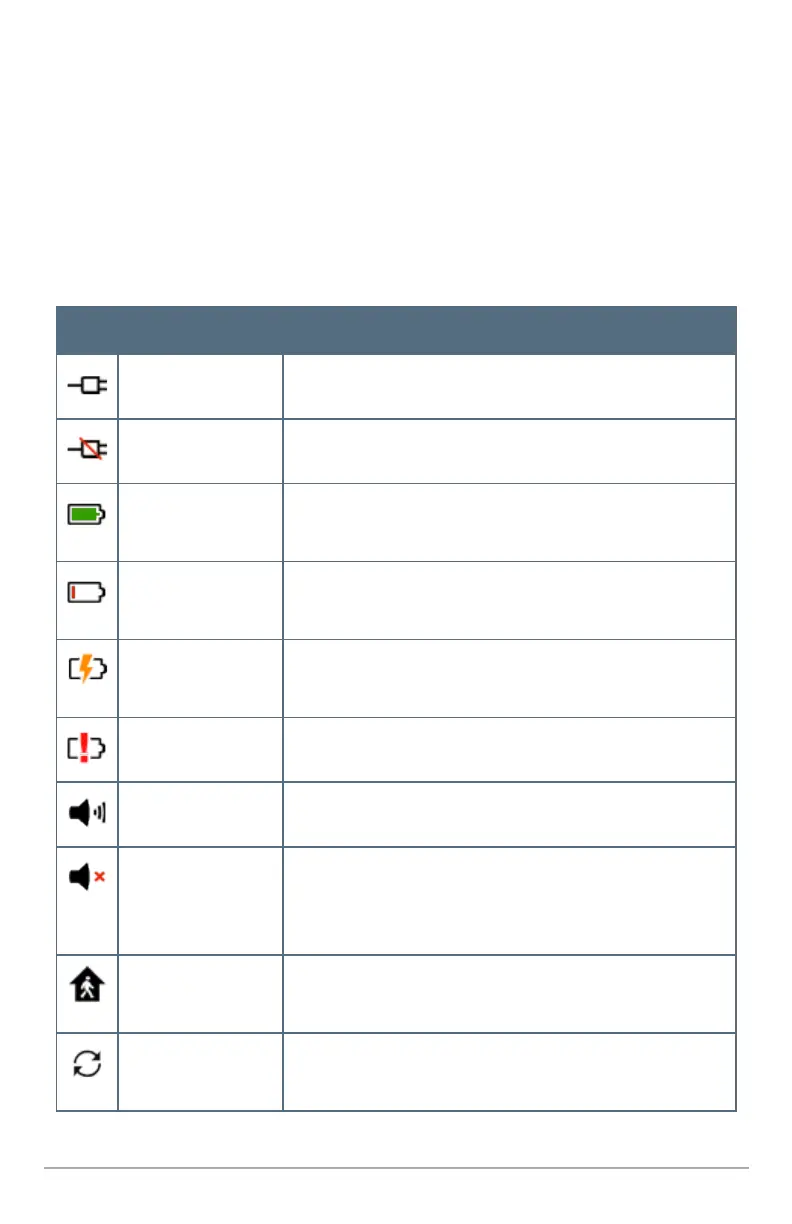
Additionally,statusiconsareusedtoindicateyoursystem’scurrentcondition.
Icon Status Description
Inputpoweron Indicatestheinputpowersupplyispluggedintothepanel.
Inputpoweroff Indicatestheinputpowersupplyisnotpluggedin.
Backupbatteryfully
charged
Indicatesthepanelbackupbatteryisfullycharged.
Backupbatterynot
charged
Indicatesthebackupbatteryisempty.
Backupbatterychar-
ging
Indicatesthebackupbatteryischarging.
Backupbatterydead Indicatesthebackupbatteryisdead.
Speakeron Indicatesthepanelspeakerison.
Speakeroff Indicatesthepanelspeakerismuted.(NOTE:Whenthesound
isoff,boththechimeandtouchscreenfeedbackaresilenced.
However,alarm-relatedsoundsareNOTsilenced.)
Motiondetection Indicatesaninteriorsecuritysensorisopen,oramotion
detectorhasjustbeenactivated.
Systemupdate Indicatesthepanelsoftwareisbeingupdated.Pressthe
updateicontodisplaystatusinformation.


 To Next Page