10 Home Security Protection
Arming to Stay Mode
StayModenormallyhasanEntryDelaysoanyonewithaUserPINcanenterwithoutcausingan
alarm.
To arm the security system in Stay Mode
1. Closeallprotectedperimeterdoorsandwindowsbeforearming.
2. VerifythattheHomebuttononthepanelislitgreenindicatingthatthesystemisreadyto
arm.TheArmbuttononthedisplaywillalsobegreenwhenalloftheperimetersensors
areclosed.
NOTE:Ifyouwanttoarmthesystemquietlywithoutsoundinganyannouncements,press
theMutebuttonbeforeperformingthenextsteps,andthenenableSilentExittosilence
theexitdelaycountdown.
3. AtthepanelHomescreen,presstheSecuritybutton.Ifthereareanyopenperimeter
doororwindowsensors,theBypasspop-upwindowappears.Closeallthesensorsdis-
playedorpressBypass Alltohavethesystembypassthedisplayedsensors.(NOTE:
Bypassedsensorswillnottriggeranalarm.Tobypasssensors,enteravalidUserPIN,
unlessyourTechnicianhasconfiguredthesystemforQuick Bypasswhichallows
bypassingopendoorsorwindowswithoutrequiringaPINcode.)
4. PressArm Staytoarmthesystem.(NOTE:Toarmthesystem,youmayneedtoentera
UserPINcodeifyourTechnicianhasturnedoffthesystem’sQuickArmingfeature.)
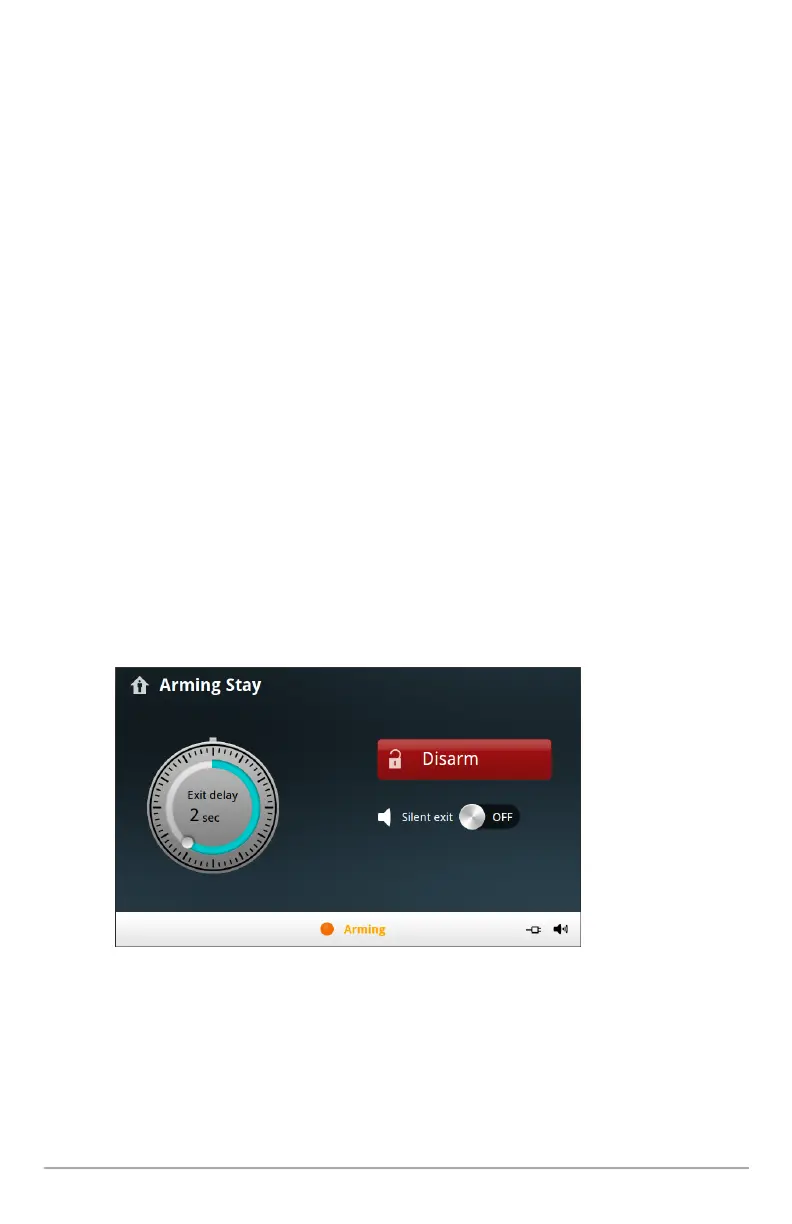
5. ThesystemwillarmandshowstheExitDelaycountingdown.
6. WhentheExitDelayexpires,thesystemisfullyarmedinStayMode.
Entry Delay in Stay Mode
WhenarmingthesysteminStayMode,anEntryDelayoptionisshownonthepanel’sArming
screen.Thisprovidesawayforanauthorizedpersontoenterusingasensor-protecteddoorand


 To Next Page