The VIVO Under Desk Keyboard Tray (SKU: MOUNT-KB03B/W) is a versatile accessory designed to enhance ergonomic comfort and optimize workspace by providing an adjustable platform for keyboards and mice. This instruction manual outlines the assembly and installation process, offering various mounting options to suit different desk configurations and user preferences.
Function Description:
The primary function of this device is to provide an under-desk platform for a keyboard and mouse, allowing users to position their input devices at a more comfortable height and distance. This helps to reduce strain on the wrists, arms, and shoulders, promoting better posture during extended periods of computer use. The tray features an adjustable mount that allows for swiveling and sliding, offering flexibility in positioning. It also includes a wrist pad for added comfort.
Important Technical Specifications:
- SKU: MOUNT-KB03B/W
- Weight Capacity: 4.4 lbs (2 kg). Exceeding this limit may result in serious injury or damage to the product.
- Material: The components appear to be made of metal for the mount and track, and a durable material for the tray and wrist pad.
- Mounting Hardware: Includes M5x15mm Screws (S-A), Washers (S-B), M5x12mm Screws (S-C), M4x12mm Screws (S-D), Bumpers (S-E), and M5x16mm Screws (S-F).
- Tools Needed: Phillips Screwdriver.
- Pilot Hole Size: 3/8" (10mm) deep pilot holes using a 1/8" (or 3mm) drill bit for mounting the track to the desktop.
- Tray Extension (Standard Installation): The tray can extend 3.54” (90mm) from the front of the desk edge.
Usage Features:
The keyboard tray offers several key usage features that cater to diverse user needs and desk types:
- Adjustable Positioning: The mount allows the tray to slide in and out from under the desk, and to swivel, providing dynamic positioning for optimal comfort.
- Three Installation Applications:
- Standard Installation: This method positions the keyboard track closest to the front edge of the desk, with the tray extending 3.54” (90mm) from the desk edge. It is ideal for desks without full clearance on the underside. The mounting template (E) is aligned with the desk edge, with the triangle in the back.
- Full Recessed Installation: This option allows the keyboard tray to slide completely underneath the desktop when not in use, providing a clean and uncluttered workspace. It requires adequate space for the keyboard track under the desk. The template (E) is aligned with the desktop edge, with the triangle in the back.
- L-Shaped Desks / Corner Desks: Specifically designed for L-shaped or corner desks, this installation method involves aligning the template (E) with a 90-degree angle marker at the corner of the desktop.
- Wrist Pad (B): A dedicated wrist pad is included to provide ergonomic support and comfort, reducing strain on the wrists during typing. It is attached to the tray (C) near the front edge.
- Easy Assembly: The manual provides clear, step-by-step instructions for assembly, starting with disassembling the mount, then attaching the track to the desktop, assembling the tray, connecting the arm, and finally installing the bumpers and wrist pad.
- Mount (A) and Track (A2): The mount (A) is initially placed upside down, and a lever is loosened to allow the arm (A1) to be slid out from the track (A2). The track (A2) is then securely mounted to the underside of the desktop using screws and washers.
- Connecting Plate (D) and Tray (C): The connecting plate (D) is used to attach the tray (C) to the arm (A1), forming the main keyboard platform.
- Bumpers (S-E): Two bumpers (S-E) are installed into the front corners of the track to provide a soft stop and protect the tray.
Maintenance Features:
While the manual does not explicitly detail maintenance features, the design implies ease of care:
- Durable Construction: The use of metal components for the mount and track suggests a robust and long-lasting product.
- Replaceable Parts: The manual mentions that if any parts are received damaged or defective, the support team can assist with replacements, indicating a commitment to product longevity and user satisfaction.
- Cleaning: The surfaces of the tray and wrist pad can likely be easily wiped clean with a damp cloth to maintain hygiene and appearance.
- Regular Checks: Users are advised to check carefully for missing or defective parts during initial setup, and it is good practice to periodically check the tightness of screws to ensure stability and safety.
- Weight Capacity Adherence: Strictly adhering to the 4.4 lbs (2 kg) weight capacity is crucial for the product's longevity and to prevent damage or injury.
Support and Resources:
VIVO offers comprehensive support for this product:
- Online Resources: A QR code and URL (https://vivo-us.com/products/mount-kb03b) are provided for helpful videos and specifications.
- Customer Support: Available Monday-Friday from 7:00 am-7:00 pm CST via phone (309-278-5303), email (help@vivo-us.com), and live chat on their website (www.vivo-us.com).
- Response Times: Average resolution time for phone calls is 5 minutes 4 seconds, for chat is less than 15 minutes, and for email is 1 hour 8 minutes (within office hours).
- Social Media: Users are encouraged to share their VIVO setup photos and tag @vivo_us.
This under-desk keyboard tray is a practical and ergonomic solution for anyone looking to optimize their workspace and improve comfort during computer use, offering flexibility in installation and reliable support.

 Need help?
 General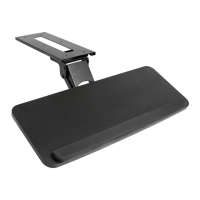

 To Next Page