This document provides an instruction manual for an electric TV wall mount, designed to securely hold a television on a wall while offering various adjustable features. The mount is intended for indoor use and is suitable for installation on wood stud walls, as well as concrete and brick walls, with specific hardware provided for each type.
Function Description
The primary function of this electric TV wall mount is to provide a robust and adjustable mounting solution for televisions. It allows users to position their TV at a desired height and angle, enhancing viewing comfort and optimizing space. The "electric" aspect implies motorized movement, enabling the TV to be raised and lowered, and potentially swiveled, using a remote control. This motorized functionality is a key differentiator, offering convenience and ease of adjustment compared to manual mounts. The mount is designed to securely attach the TV to the wall, ensuring stability and safety. It also includes features for cable management, helping to maintain a tidy and organized appearance around the television. The overall design aims to integrate the TV seamlessly into the living space, providing both aesthetic appeal and practical functionality.
Usage Features
The electric TV wall mount offers several user-friendly features that enhance its usability and versatility:
- Motorized Height Adjustment: A significant feature is the ability to electrically raise and lower the TV. This is controlled via a remote, allowing users to effortlessly adjust the TV's vertical position to suit different viewing preferences or activities. This is particularly useful in multi-purpose rooms or for users who desire dynamic viewing angles.
- Remote Control Operation: The inclusion of a remote control (G) simplifies the operation of the motorized functions. Users can adjust the TV's height from the comfort of their seating position, eliminating the need for manual interaction with the mount itself.
- Swivel Capability: The mount allows for manual swiveling of the TV to the left and right. This feature provides flexibility in directing the screen towards different areas of a room, accommodating various seating arrangements or reducing glare from windows.
- Cable Management: Integrated cable clips on the arm of the mount help to organize and conceal cables, preventing them from dangling unsightly. This contributes to a cleaner and more professional installation, enhancing the overall aesthetic of the TV setup.
- Compatibility with Various Wall Types: The manual provides instructions and hardware for installation on wood stud walls, as well as concrete and brick walls. This broad compatibility makes the mount suitable for a wide range of residential and commercial environments.
- VESA Bracket System: The mount utilizes a VESA bracket system (E) for attaching to the TV. This standardized system ensures compatibility with a broad range of television models, provided they adhere to VESA mounting patterns. The manual details how to attach these brackets using various screws, washers, and spacers to accommodate different TV back panel designs.
- Easy Installation Steps: The manual breaks down the installation process into clear, sequential steps, making it manageable for users with varying levels of DIY experience. It includes detailed diagrams and instructions for each stage, from measuring mounting height to attaching the TV.
- Safety Features: The manual emphasizes safety warnings, including not exceeding the weight capacity and avoiding placing hands in the arm while operating. These precautions are crucial for preventing injury and ensuring the longevity of the device.
- Aesthetic Design: The inclusion of wall plate covers (B) helps to conceal the mounting hardware and power cord, contributing to a clean and finished look once installed. The front cover (F) also aids in this aesthetic integration.
- Pre-installed Hardware: The mount comes with some pre-installed nuts, metal washers, and plastic washers (A1, A2, A3) that need to be removed during the initial setup, indicating a thoughtful design for assembly.
Maintenance Features
While the manual does not explicitly detail ongoing maintenance, several aspects imply a design focused on durability and ease of troubleshooting:
- Robust Construction: The components, such as the mount (A), VESA brackets (E), and TV plate (D), appear to be made from sturdy materials, suggesting a design intended for long-term use and minimal wear.
- Clear Troubleshooting Support: The manual provides contact information for customer support (email, phone, and live chat) for assistance with missing or defective parts, installation queries, or general product support. This readily available support acts as a maintenance feature, ensuring users can resolve issues efficiently.
- Instructional Videos and Specifications: The inclusion of a QR code and a link to helpful videos and specifications on the manufacturer's website (vivo-us.com) serves as a valuable resource for maintenance and understanding the product better. These resources can guide users through common issues or provide visual aids for complex steps.
- Warning Against Exceeding Weight Capacity: The explicit warning about not exceeding the weight capacity (77lbs / 35kg) is a key maintenance instruction. Adhering to this limit is crucial for preventing structural damage to the mount and ensuring safe operation, thereby extending its lifespan.
- Proper Installation as Preventative Maintenance: The emphasis on correct installation, including verifying wall construction and using appropriate hardware, is a form of preventative maintenance. A properly installed mount is less likely to develop issues over time.
- Silicon Shipping Pad (A4): The instruction to remove and discard the silicon shipping pad (A4) after initial lowering of the arm indicates a protective measure during transport. This ensures the mechanical components are not stressed or damaged before use.
- Regular Checks (Implied): Although not explicitly stated, the nature of a mechanical device suggests that periodic checks of the mounting screws and connections for tightness would be good practice to ensure continued safety and stability.
In summary, this electric TV wall mount is a sophisticated solution for TV placement, offering motorized adjustments, remote control convenience, and robust construction. Its design prioritizes ease of use, safety, and aesthetic integration, supported by comprehensive installation guidance and accessible customer support.

 Need help?
 General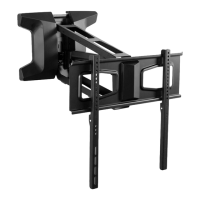

 To Next Page