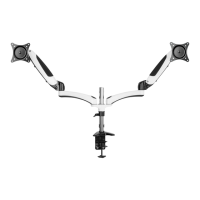
This document is an instruction manual for the VESA Mounting Adapter Kit for iMac, identified by SKU: STAND-MACB. This kit is designed to allow iMacs to be mounted to VESA-compatible stands or arms, providing users with greater flexibility in positioning their displays.
Function Description:
The VESA Mounting Adapter Kit for iMac serves as an intermediary bracket that converts the proprietary stand attachment point of an Apple iMac into a standard VESA mounting pattern. This enables iMac users to replace the original iMac stand with a VESA-compatible monitor arm or wall mount, which can offer ergonomic benefits such as adjustable height, tilt, swivel, and rotation, as well as freeing up desk space. The kit is specifically designed to accommodate different iMac models, including both 21.5" and 27" versions, with provisions for various model years.
Important Technical Specifications:
- SKU: STAND-MACB
- Compatibility: Designed for Apple iMacs. The manual differentiates between 21.5" and 27" iMac installations.
- Adapter Rings: Includes two adapter rings:
- 70mm Adapter Ring (B): Fits 27" iMac models from mid-2012 and older.
- 72mm Adapter Ring (C): Fits 27" iMac models from late-2012 and newer.
- Note: 21.5" iMacs do not use plastic adapter rings.
- Mounting Hardware (Included):
- Adapter Plate (A): x1
- 70mm Adapter Ring (B): x1
- 72mm Adapter Ring (C): x1
- Clamp Plate (D): x1
- M4x12 Nylon Screws (M-A): x2
- M4x14 Screws (M-B): x4 (for attaching adapter plate to VESA mount)
- M5x16 Screws (M-C): x8 (for attaching adapter plate and clamp plate to iMac base)
- D5 Washers (M-D): x4
- M4 Nuts (M-E): x4
- M5 Nuts (M-F): x4
- Required Tools (Not Included): Phillips Screwdriver.
- Weight Capacity: The manual explicitly states, "Do not exceed weight capacity," implying that users should refer to the specifications of their VESA mount for the maximum supported weight. The adapter kit itself is designed to hold the iMac, but the overall system's weight capacity is determined by the VESA mount.
- Material: The screws M-A are specified as "nylon screws," indicating a non-metallic material for specific attachment points, likely to prevent scratching or damage to the iMac's finish or for electrical insulation. The nuts are "nyloc type nuts," which feature a nylon insert to resist loosening under vibration.
Usage Features:
- Installation Process: The manual outlines a clear, three-step installation process:
- Step 1 (Attaching to VESA Mount): Involves securing the Adapter Plate (A) to a VESA mount using a combination of M4x12 nylon screws (M-A), M4x14 or M5x16 screws (M-B or M-C), D5 washers (M-D), and M4 or M5 nyloc nuts (M-E or M-F). This step emphasizes force-tightening the screws through the nylon inserts of the nyloc nuts for a secure fit.
- Step 2 (Attaching to iMac): This step is divided into two options based on iMac size:
- Option A (21.5" iMac): Assemble the Adapter Plate (A) and Clamp Plate (D) to the iMac's base using M5x14 screws (M-C). Users are instructed to ensure proper fit over the cable hole, leave screws slightly loose initially, tighten nylon screws to level the iMac, and then fully tighten the remaining screws. No adapter rings are used for 21.5" iMacs.
- Option B (27" iMac): Assemble the Adapter Plate (A), the appropriate Adapter Ring (B or C), and the Clamp Plate (D) to the iMac's base using M5x14 screws (M-C). Similar to the 21.5" installation, proper fit over the cable hole, initial loose fitting, nylon screw tightening for leveling, and final tightening of all screws are required. The manual provides guidance on selecting the correct adapter ring (70mm for mid-2012 and older, 72mm for late-2012 and newer 27" iMacs).
- Step 3 (Adjustment): Once installed, users can adjust the iMac to a comfortable viewing position, leveraging the capabilities of their VESA mount.
- User Support: VIVO provides comprehensive customer support:
- Contact Hours: Monday-Friday, 7:00 am - 7:00 pm CST.
- Email Support: help@vivo-us.com
- Phone Support: 309-278-5303
- Live Chat: Available on www.vivo-us.com.
- Online Resources: A QR code and URL (https://vivo-us.com/products/stand-macb) are provided for helpful videos and product specifications.
- Social Media: Users are encouraged to share their VIVO setup photos and tag @vivo_us.
- Response Time Metrics: VIVO publishes its customer service performance metrics, indicating a commitment to timely support:
- Average Response Time (within office hours): 1 hour 8 minutes (23% within <15m, 38% within <30m, 61% within <1hr, 83% within <2hr, 92% within <3hr).
- Average Resolution Time (within office hours): <15 minutes (for chat), 5 minutes 4 seconds (for phone).
- Parts Replacement: VIVO offers to replace damaged or defective parts to ensure a fully functioning product.
Maintenance Features:
- Choking Hazard Warning: The manual includes a "WARNING: CHOKING HAZARD" for small parts, emphasizing that the product is "NOT FOR CHILDREN UNDER 3 YEARS. ADULT SUPERVISION IS REQUIRED." This is a safety precaution related to the components during assembly or if disassembled.
- General Safety Warnings:
- Users are advised to contact a qualified technician if they do not understand the directions or have doubts about safety.
- Instructions to check for missing or defective parts before installation.
- Warning against improper installation, which can cause damage or serious injury.
- Prohibition from using the product for purposes not explicitly specified in the manual.
- Strict instruction not to exceed the weight capacity of the VESA mount.
- Disclaimer that VIVO is not liable for damage or injury caused by improper mounting, incorrect assembly, or inappropriate use.
- Nyloc Nuts: The use of nyloc nuts (with nylon inserts) for securing the adapter plate to the VESA mount suggests a design choice for enhanced security and resistance to loosening over time, which can be considered a low-maintenance feature as it reduces the need for frequent re-tightening.
- Regular Checks (Implied): While not explicitly stated as a maintenance step, the general safety warnings and the nature of mounting equipment imply that users should periodically check the tightness of all screws and the stability of the mount to ensure continued safe operation.

 Need help?
 General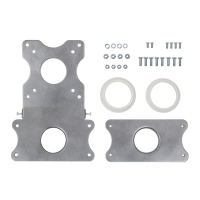

 To Next Page