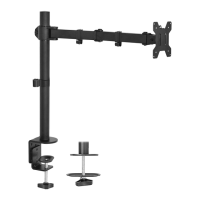
This document outlines the assembly and usage instructions for the VIVO Single Monitor Desk Stand, SKU: STAND-V001V. This product is designed to provide a stable and adjustable mounting solution for a single monitor on a desk surface, enhancing ergonomic comfort and optimizing workspace organization.
Function Description
The VIVO Single Monitor Desk Stand serves as a robust and versatile platform for mounting a single computer monitor. Its primary function is to elevate the monitor to an optimal viewing height, reducing strain on the neck and eyes, and freeing up valuable desk space that would otherwise be occupied by a monitor's native stand. The stand features a telescopic column that allows for effortless height adjustment, catering to individual user preferences and various desk setups. The VESA plate attachment ensures compatibility with a wide range of monitors, accommodating both flat and curved back designs. Integrated cable management features help maintain a tidy and professional workspace by routing power and display cables along the stand's column. The stand also offers various articulation options, including tilt and rotation, to further customize the monitor's position for optimal viewing angles and collaborative work.
Usage Features
The VIVO Single Monitor Desk Stand is engineered for ease of use and adaptability.
- Assembly: The assembly process is straightforward, requiring minimal tools, primarily a Phillips screwdriver and the included Allen wrenches. The instructions are broken down into clear, sequential steps, starting with mounting the telescopic column to the base. Screws (E) are used to secure the column (A) to the base (B), tightened with the 4mm Allen wrench (G). A non-slip pad (F) is then applied to the base, covering the screws and providing stability while protecting the desk surface.
- Monitor Attachment: The stand supports two primary options for attaching the VESA plate (C) to the monitor, depending on the monitor's back design.
- Flat Back Monitors: For monitors with a flat back, shorter screws (M-A or M-C) and washers (M-E) are used to secure the VESA plate (C) directly to the monitor. This ensures a flush and secure fit.
- Curved Back Monitors: For monitors with a curved back, longer screws (M-B or M-D), washers (M-E), and spacers (M-F) are provided. The spacers create the necessary clearance to accommodate the curvature, ensuring the VESA plate is mounted securely without damaging the monitor.
- Mounting the Monitor to the Stand: Once the VESA plate is attached to the monitor, the entire assembly slides onto the mounting bracket of the stand. A thumbscrew (D) is then used to secure the monitor in place, preventing accidental dislodgement.
- Tilt Adjustment: The stand offers a tilt adjustment feature, allowing the user to angle the monitor up or down. This adjustment is made using the 6mm Allen wrench (H), which tightens or loosens the tilt support mechanism. This feature is crucial for reducing glare and achieving an optimal viewing angle based on the user's seating position and ambient lighting.
- Height Adjustment: A key ergonomic feature of this stand is its easy height adjustment. To raise or lower the monitor, the user simply pulls up a lever located on the column. This disengages a locking mechanism, allowing the telescopic column to move freely. Once the desired height is achieved, pressing the lever down locks the monitor securely in its new position. This allows for quick and precise adjustments to suit different users or tasks.
- Rotation and Swivel: The stand provides significant flexibility in monitor positioning. It allows for a ±45° swivel, enabling the monitor to be angled left or right. Furthermore, it supports a ±180° rotation, allowing the monitor to be oriented in either landscape or portrait mode. The tilt range is also generous, with a +20° upward tilt and a -20° downward tilt, offering comprehensive control over the monitor's angle. These articulation features are invaluable for collaborative work, presenting information, or simply finding the most comfortable viewing position.
- Cable Management: To maintain a clean and organized workspace, the stand incorporates a pre-installed clip on the column. This clip is designed to route and secure monitor cables (power, HDMI, DisplayPort, etc.) along the stand's column, preventing them from dangling loosely and creating clutter. This not only improves aesthetics but also reduces the risk of cables getting snagged or damaged.
- Tool Storage: The pre-installed clip also serves a dual purpose as a convenient storage location for the included Allen wrenches (G and H). This ensures that the tools needed for adjustments are always readily available, preventing them from being misplaced.
Maintenance Features
The VIVO Single Monitor Desk Stand is designed for minimal maintenance, focusing on durability and long-term performance.
- Durability: The stand is constructed from robust materials, ensuring its ability to support a monitor securely over time. The metal components are designed to withstand regular adjustments and usage without compromising structural integrity.
- Cleaning: The surfaces of the stand can be easily cleaned with a soft, damp cloth. Avoid using harsh abrasive cleaners or solvents, as these could damage the finish. Regular dusting will help maintain its appearance.
- Fastener Checks: Periodically, it is advisable to check all screws and fasteners to ensure they remain tight. Over time, vibrations or frequent adjustments might slightly loosen connections. Retightening them with the appropriate Allen wrenches (G and H) will maintain the stand's stability and prevent any wobbling.
- Pad Integrity: The non-slip pad (F) on the base helps protect the desk surface and provides stability. Users should periodically check the pad for any signs of wear or damage. While designed for durability, if the pad becomes damaged, it might affect the stand's stability or scratch the desk.
- Lever Functionality: The height adjustment lever is a mechanical component. Users should ensure it operates smoothly. If it becomes stiff or difficult to engage/disengage, a small amount of silicone-based lubricant (avoiding oil-based lubricants that can attract dust) might be applied to the pivot points, though this is rarely needed for well-maintained units.
- Cable Clip Integrity: The cable management clip is designed to hold cables securely. Users should ensure the clip remains intact and effectively holds the cables. If it becomes loose or broken, cables may become unmanaged.
- Weight Capacity Adherence: The most critical maintenance aspect is adhering to the specified weight capacity. Overloading the stand can lead to structural failure, damage to the stand or monitor, and potential injury. Users should always ensure their monitor's weight does not exceed the stand's maximum capacity.
- Tipover Prevention: As a crucial safety measure, the manual highlights a "TIPOVER WARNING." While the stand is designed for stability, users are advised to never allow children to climb, stand, hang, or play on any part of the monitor or stand. For enhanced safety, especially in environments with children or pets, using a tipover restraint or anchoring the stand to the wall is recommended. While not a direct maintenance task, it's a critical safety consideration for the long-term safe operation of the device.
By following these usage and maintenance guidelines, users can ensure the VIVO Single Monitor Desk Stand provides a reliable, ergonomic, and organized workspace for many years.

 Need help?
 General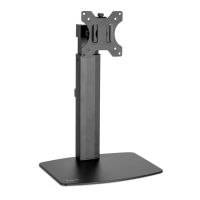

 To Next Page