Need help?
Do you have a question about the Vivo STAND-V002O and is the answer not in the manual?
Warns of serious or fatal crushing injuries from tipover and provides prevention methods.
Alerts to small parts being a hazard for children under 3 years.
Details how to attach the clamp base to the monitor arm using provided hardware.
Explains the process for mounting the arm using the grommet base option.
Guides on securing monitors to the VESA plates using specific bolts and washers.
Instructs on adjusting the gas spring arm tension for optimal monitor movement.
Details removing plastic covers from the gas spring arms.
Shows how to route monitor cables through the arm and reattach covers.
Illustrates the range of motion and adjustment capabilities for the monitor arms.
 General
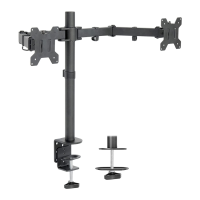
| Model | STAND-V002O |
|---|---|
| Category | Racks & Stands |
| Color | Black |
| VESA Compatibility | 75x75mm, 100x100mm |
| Rotation | 360° |
| Number of Monitors | 2 |
| Adjustable Height | Yes |
| Type | Monitor Stand |
| Material | Steel |
| Screen Size | Up to 27 inches |
| Compatibility | Most VESA-compatible monitors |
| Mounting Type | Desk Mount |

 To Next Page