5
English
NOTE:
1. Connect and route cables before you secure the recessed-mount bracket to a ceiling.
2. For details on the cabling connections with each camera, please refer to their Quick
Installation Guide.
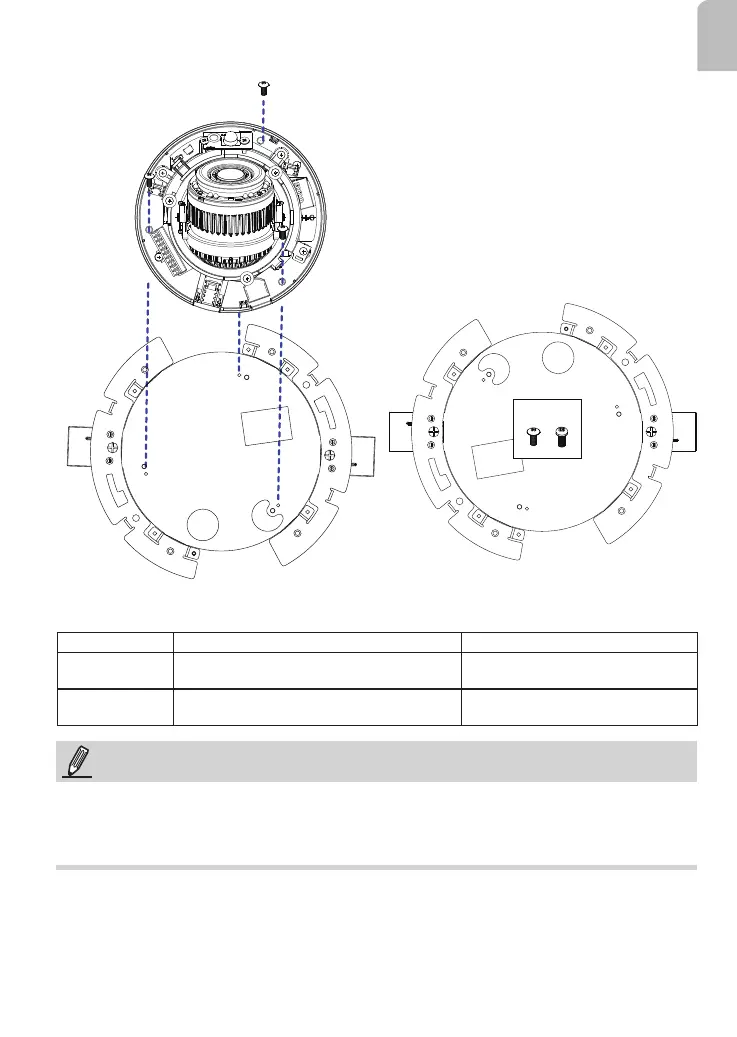
6. Install camera to the recessed-mount bracket by driving 3 screws.
Mount hole Applicable models Screws
M4 FD9165-HT, FD9167-H/HT, FD8177-HT,
FD9187-H/-HT
3x round head M4X8L
M3 FD8182F2/T, FD9171-HT, FD9181-HT,
FD816BA-HT/HF2
3x round head M3X8L
M3 M4
M3
M4
M3
M4
M3
M4














 To Next Page