VIVOTEK
User's Manual - 103
PTZ > PTZ settings
(only Applicable to Stream 3)
This section explains how to control the Network Camera’s Pan/Tilt/Zoom operation.
Digital: Control the e-PTZ operation. Within a eld of view,it allows users to quickly move the
focus to a target area for close-up viewing without physically moving the camera.
Digital PTZ Operation (E-PTZ Operation)
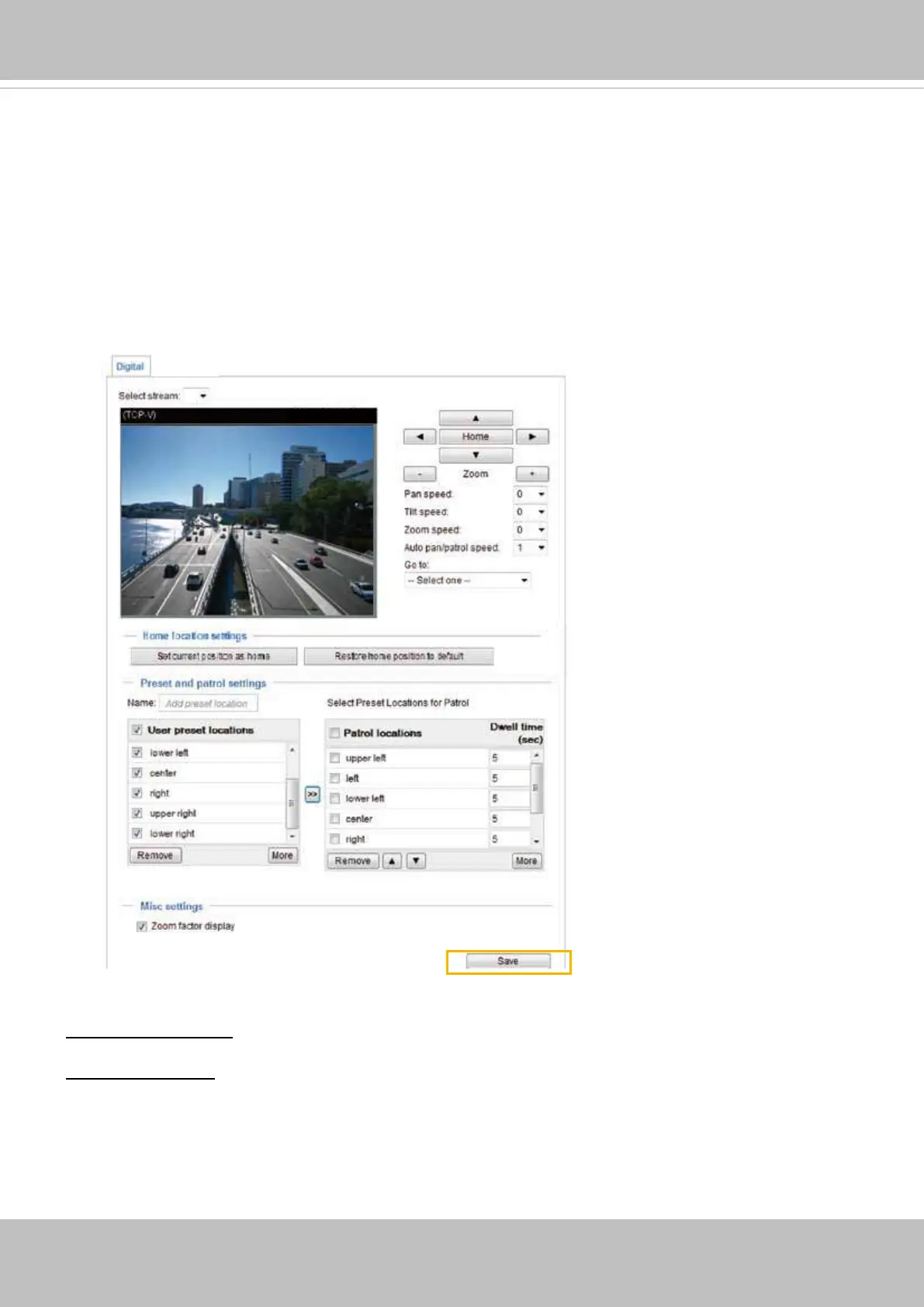
The e-PTZ control settings section will be displayed as shown below:
For e-PTZ related details, please refer to page 105.
Auto pan/patrol speed: Select the speed from 1~5 (slow/fast) to set up the Auto pan/patrol speed control.
Zoom factor display
If you check this item, the zoom indicator will be displayed on the home page when you zoom in/out the
live viewing window as the picture shown on the next page.
When completed with the e-PTZ settings, click Save to enable the settings on this page.
x1.8
x1.8
2015/05/20 09:57:30
3


 To Next Page