EasyManua.ls Logo

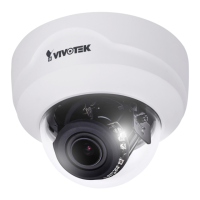
Vivotek FD8171 - User Manual

Vivotek FD8171
221 pages
Print Icon
To Next Page IconTo Next Page
Loading...
Rev. 1.0
User’s Manual
Fixed Dome
Network Camera
FD8171
3MP 20M IR Smart Focus System
Rev. 1.0

Table of Contents

Other manuals for Vivotek FD8171

Question and Answer IconNeed help?

Do you have a question about the Vivotek FD8171 and is the answer not in the manual?

Summary

Overview

Read Before Use

Important information and warnings for users before initial setup and operation.

Hardware Installation

Step-by-step instructions for physically installing the network camera.

Network Deployment

Guidelines for connecting the camera to a network.

Accessing the Network Camera

Using Web Browsers

Instructions for accessing the camera's interface via web browsers.

Main Page

Client Settings

Media > Image

Focus

Procedure for performing automated zoom and focus adjustments.

Media > Video

Network > General settings

Network Type

Selection between LAN and PPPoE for network connection.

Security > User Account

Root Password

Procedure to set the administrator 'root' password for initial security.

PTZ > PTZ settings

Digital PTZ Operation (E-PTZ Operation)

Controlling camera pan, tilt, and zoom operations remotely.

Event > Event settings

Trigger

Defining event triggers such as motion detection or digital input.

Action

Specifying actions to perform when an event is triggered.

Recording > Recording settings

Summary

Overview

Read Before Use

Important information and warnings for users before initial setup and operation.

Hardware Installation

Step-by-step instructions for physically installing the network camera.

Network Deployment

Guidelines for connecting the camera to a network.

Accessing the Network Camera

Using Web Browsers

Instructions for accessing the camera's interface via web browsers.

Main Page

Client Settings

Media > Image

Focus

Procedure for performing automated zoom and focus adjustments.

Media > Video

Network > General settings

Network Type

Selection between LAN and PPPoE for network connection.

Security > User Account

Root Password

Procedure to set the administrator 'root' password for initial security.

PTZ > PTZ settings

Digital PTZ Operation (E-PTZ Operation)

Controlling camera pan, tilt, and zoom operations remotely.

Event > Event settings

Trigger

Defining event triggers such as motion detection or digital input.

Action

Specifying actions to perform when an event is triggered.

Recording > Recording settings

Vivotek FD8171 Specifications

General IconGeneral
BrandVivotek
ModelFD8171
CategorySecurity Camera
LanguageEnglish

Related product manuals